
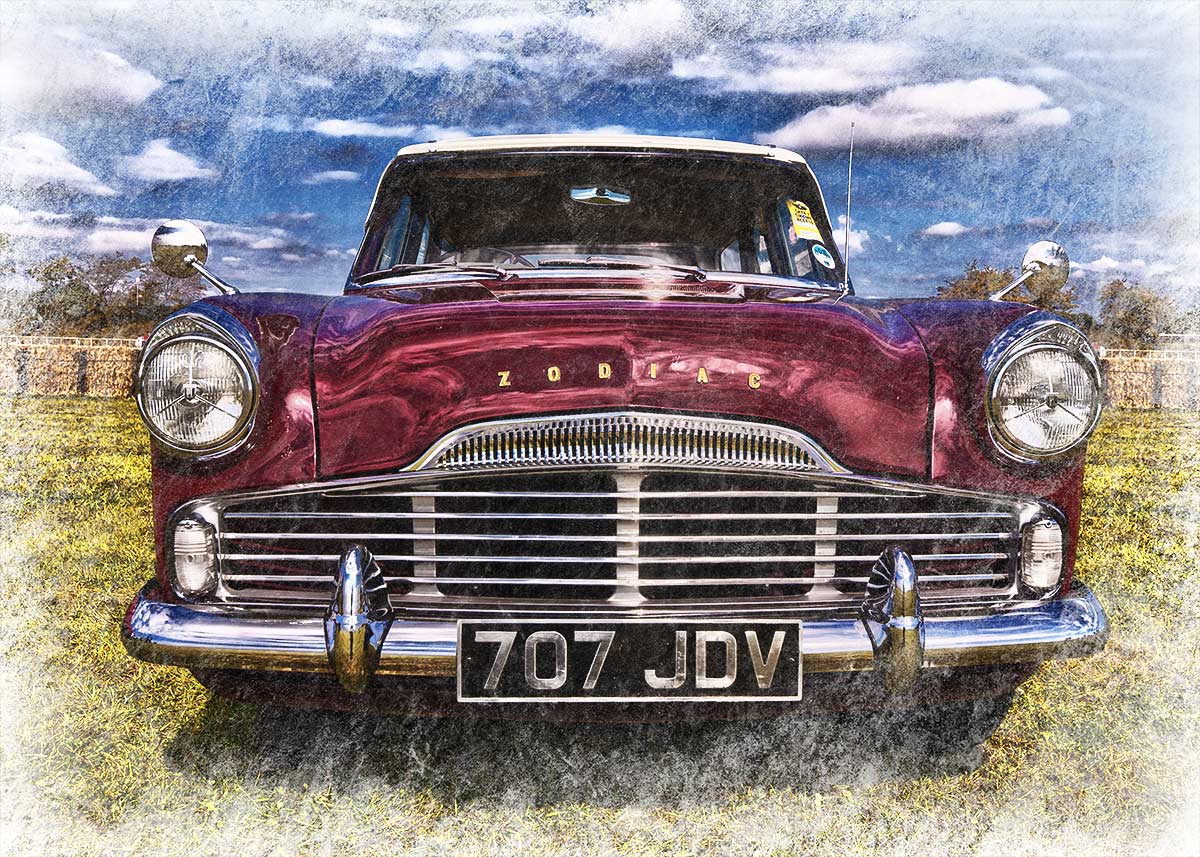
 This weeks Friday Freebie is an eroded texture which is simple to use and gives amazing results. It’s a black and white texture that has a dark mottled centre, fading to a lighter edge.
Full download instructions are below but you can also
Click Here To Download the Eroded Edge Texture
Unlike most textures, the eroded edge effect works best with photos that have large areas of darker tones. All you need to do is paste the texture over your photo and set the layer blending mode. There are loads of different layer blending modes to choose from and they’ll all give a different look, with this texture Screen blending mode worked well as did Overlay and Soft Light.
If you create a photo using the Friday Freebie then let me (and everyone else) know by leaving the link in the comments below.
Usage rules
The texture image is copyright Gavin Hoey 2013. Use is limited to any personal, non-commercial purposes. Please share the Friday Freebie by linking back to this page. Do not redistribute the original texture without my permission.
Download instructions
Click the link https://drive.google.com/file/d/0B_Mmmm3K1utNc2tESjJKYTNIUUk/view?usp=sharing
1. Click the Download button 
2. The download should start automatically
Thanks Gavin. How do I create a link to my image, please?
Thanks so much! Coincidentally, I used it on a vintage car picture that I just took yesterday. You can see it (and theoriginal, untextured image) on flickr:
http://www.flickr.com/photos/calliope/9684951253/
In the “website” section, when you post a comment on Gavin’s blog, all you need to do is post a link to a website that hosts your photos (in my case I post images on Flickr). The link in the website section should point to a gymnasium from an abandoned POW camp, showing the image in HDR… This is just an example.
Flickr allows you to obtain the link to any photo that is shareable, simply by clicking on the preview image and selecting the icon that looks like a partial square with an arrow to the right, coming out of the square. This will display the link to be shared, as well as other options for sharing, like Facebook and Twitter.
Thanks Gavin: http://carloantonio25.deviantart.com/art/Awaiting-398494941?ga_submit_new=10%253A1378493879
https://creative.adobe.com/file/2464b4ac-ac6c-4582-b103-3fc48ae39f73?section=activity&refresh=1378494455152
Thank you, again, sir! http://photographybysewell.webs.com/apps/photos/photo?photoid=184254396
Hi Gavin , Thank you for your nice share , all your shares and tips upgrade my photography job. i try the template and the result is at the following link .
http://www.flickr.com/photos/101466904@N07/9698661361/
Hi Gavin I alway encounter problems when trying to dowload files from your CC page. I follow your instructions explicitly. I am using W7[SP1] & IEv9, after clciking the download button IE gives me the options to either Open, Save or Save As – any selection from me results in IE using the url for your file as the file name and concequently fails to download. Have you or any of your follows encountered this problem? Its driving me nuts.
Thanks Terry
That’s s new and not something I can reproduce. I suggest trying a browser like Chrome from Google. If I run in to web issues, switching browser usually solves things.
Okay Gavin thanks, I’ll give another browser a wirl and see how it goes. Thanks Terry
Gavin I forgot to ask but I recall an artica/tutorial you did a while back re taking a series of headshots, with a single speedlite and black popup background, at some corporate event and then designing a grid, in Photoshop, in which to display them. Do you recall this? If so can you post a link – much appreciated. Terry
Hello Gavin,
Thank you for all the nice things you share with us.
Annie