



Mug Shot Background
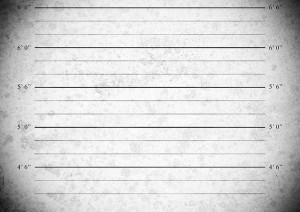 Last week I released a video called two portraits, one light and ever since I’ve been getting a constant stream of requests to share the mug shot background I used in the final photo. The background was one I made a while back for a photography workshop using a combination of grungy textures and a bit of Photoshop know how.
The background is just a simple JPG file which you can adjust to your own needs. For example you may wish to adjust the brightness using Levels or add a splash of colour with the Colorize option in Hue/Saturation.
Download instructions are below and once again I’m sharing the JPG file through my Adobe Creative Cloud page. No sign up is required to get a copy of the template so you’re free to jump in and make your own triptych images.
Download the Mug Shot background by clicking here
Usage rules
The image is copyright Gavin Hoey 2013. Use is limited to any personal, non-commercial purposes. Please share the Friday freebie by linking back to this page. Do not redistribute the original image without permission.
Download instructions
Click the link https://drive.google.com/file/d/0B_Mmmm3K1utNb0duUlQ4eVZQMkk/view?usp=sharing
1. Click the Download button 
2. The download should start automatically














This will be lots of fun to play with! Thanks!
Thanks, Gavin. I wanted that as soon as I saw your shot. Great stuff.
Great, I was hoping this would become available.. great video that goes with it too,, thanks Gavin. 😉
Thanks Gavin!
Many Many Thanks!!! and more power to you!!!! you are my Idol!!!! 🙂
Thanks a million Gavin!!
Your video tutorials are the best, Gavin! I’ve learned so much from them – and thanks for sharing the mug shot background. Can’t wait to try it out.
Thank you so much. Your video tutorials are brilliant!
I just wanted to say thank you for the wonderful tutorials! So easy to follow. I will try this mug shot on one of my little one.
I always enjoy your tutorials they are loaded with information and techniques. Check my email everyday to see any new work you’ve posted. Keep up the great work.
Carl
USA
Thanks for the download Gavin – I used (a slightly amended version of) it to get my cat into a lot of trouble here – http://www.flickr.com/photos/24018267@N00/10766023213/ – hope you like 😉
Love it 🙂
Thank you very much, for the file!