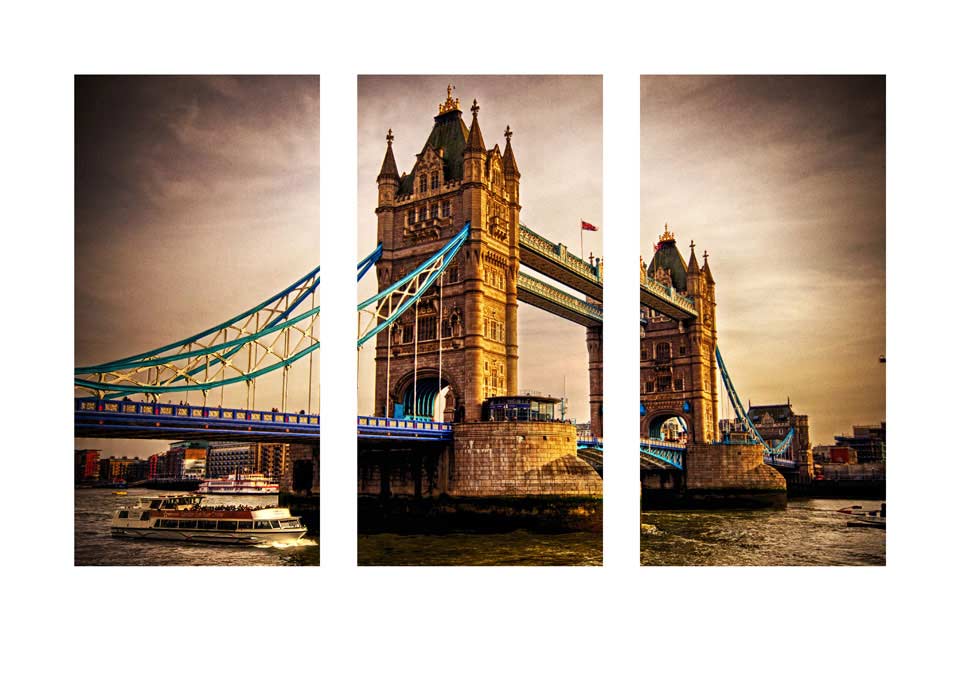
This weeks Friday Freebie is a Triptych Photoshop action. If you’re new to the art of the triptych, it’s simply three images in one picture and this action will make one with a single click.
You can download the action here: Triptych Sample
The action I’m sharing today takes an open photo in Photoshop and makes the basic triptych effect.
The action will split your photo into three panels and add a wide border. You’ll need a landscape format (wide) image to get the best from the action. I’ve left all three panels as layers at the end of the action, which means you’re free to alter, adjust and tweak the effect to your hearts content.
The action will work with Photoshop CC, CS6, CS4, CS4, CS3 but sadly not with Elements.
If you create a great photo with my action then feel free to link to it by leaving a comment below.
Usage rules
The action is copyright Gavin Hoey 2013. Use is limited to any personal, non-commercial purposes. Please share the Friday Freebie by linking back to this page. Do not redistribute the original action without my permission.
Download instructions
The direct link to download the actions is www.gavtrain.com/free/triptych-sample-gavtrain.zip
No support is provided with the Friday Freebies. If you need help Google or YouTube the question and you’ll almost certainly find the answer 🙂
Hi Gavin –
Thanks for posting this action. I’m finding that the registration of the individual images is a little off and doesn’t provide a continuous flow from one component to the next. This is most notable with lines that cross between images. I did notice this in your example as well after closer inspection. Thoughts?
k
Hi Kevin.
Thanks for the feedback. As the Action slices the image into thirds and moves them apart there will be a loss of registration. To me that’s all part of the effect but you could always adapt the final layered image by filling in the panels with black, selecting them and then use the “Paste Into” command in Photoshop to get perfect registration.
Appreciate the reply and suggested alternative. This one is with the original action –
http://www.flickr.com/photos/15197342@N03/9100453238/
As always, thanks for posting this and all of the Friday Freebies. Great stuff, creative, inspiring.
k
Hi Gavin
I tried to download your action and all I get is computer jargon on the screen.
Thanks
Jerry
Did you install the actions or just open them? Actions need to installed into Photoshop. Lots of help on that on Google/YouTube including this video from Me 🙂 http://www.youtube.com/watch?v=ZjrG7jN9VwA
Hi Gavin.
Thanks again for the Friday Freebie.
Really appreciate these and all of your help with the tutorials.
Here’s my first go at using in on a shot that I took in the Lake District the other week as the sun was going down.
http://www.garykenyon.co.uk/g/triptych.jpg
Gavin all I did was click on the download link.
Jerry
Try right clicking the link and then saving. Seems to working OK at my end.
I too tried to download, but all I got was text. When I tried to save it, I got a message saying that I couldn’t use the .atn extension but had to save it as a web archive. I’ll try again with another browser.
It worked with Safari but not with Firefox.
Gavin
That worked
Thankyou
Jerry
Hi Gavin, Mine downloaded fine….thank you again Gavin, you wonderful man 🙂
Gavin …
The action works perfectly!!! Thank you so much for your kind sharing! One question about the triptych action … is there a way to change the background color? Looking forward to the upcoming variations!
Great!
I am exploring the fascinating photography world and Photoshop is a new tool for me.
I was trying to find something that could split a photo in parts but save into different files in order to print they separately.
Is this feasible?
Thanks
It worked with Safari very well.
Thanks for this Gavin – up and working fine – had to adapt the final layered image on a couple but no big deal!!! once again thanks.
Thanks a mil for this tip Gavin. Keep on inspiring us photographers.
Here’s my shot:-
http://shawnfields.info/shawn-fields-photography/2013/6/21/road-to-nelson-nevada
Thanks Gavin (all the way from Australia) … we love you and your freebies here too 😀
Merci beaucoup je vais testé .Un grand merci pour toute l’aide que vous nous apporter ainsi que vos conseil très précieux .Je vous souhaite une bonne journée à bientôt.
Dan
Gavin, This is piece I did from your Tut, That was a wonderful tutorial I hope you like this.
https://www.facebook.com/photo.php?fbid=10151392616526862&set=a.10150922250901862.406622.566981861&type=3&theater
Unitl I followed Gavin’s tutorials on making Triptychs I had not even thought about it. I do find them fun to do, and the Friday Freebie action really makes things very easy, just add a background and some fx. My sincere thanks Gavin for making this available to us.
cheers for the Friday freebies and inspiration Gavin. I didn’t use the above action, but one from the action pack with a little modification …
http://www.flickr.com/photos/7wishes/9156444617/lightbox/
Thanks for this Gav, worked like a dream, very happy!
Cheers Gavin. worked perfectly in cs4
Thanks for the Instant Triptych Sample.
Here is my shot:
http://www.flickr.com/photos/tweetram/9187619100/
Hi Gavin,
great tutorial. What would i need to add to this action to split a square photo into 9 equal parts ?
Thanks for the Instant Triptych Action.
Here is my image :
http://www.flickr.com/photos/9648743@N02/9465177617/
A really great action. Quite happy with the result
Thanks Gavin
http://www.flickr.com/photos/thor_arne/9527272669
Thanks Gavin, as always great stuf
There is an old saying that goes “do it once, do it right”
and it. Always choose a system manufactured by a well-known
and reputable company. You may be surprised to learn that
the best picture quality is easily available
for free.
thank you so much! it works beautifully for me!! love it!!
Hi Gavin.where do I find the instructions how to work this ,I am a silver surfer new to triptych.
Superb freebie Thank you very much.
Is there a away of changing the background colour to say black ?
Thank you so much for this wonderful Action. I enjoyed using it with an old computer; however, I have loaded it into Photoshop 2020 and am unable to PLAY it. Is is compatible with PS 2020?
Or is there something I have failed to do to get it to load properly.
In response to the above comment, I have deleted the former action and re-loaded it. It PLAYS just fine!
Again, many thanks for the gift of this Action. I’ll enjoy using it.
Just found your post describing the tryptych action. Thanks so much. Had lots of fun modifying the result as seen below.
https://www.flickr.com/photos/qscft680-plm/49810272306/in/dateposted/
Never would have been able to create an action until I studied your instant action.