
 I know a lot of you enjoyed using the Friday freebie grungy frame I uploaded a few weeks back, so I’m going to give away another one.
This time the grungy border has a more industrial feel with peeling paint and screw heads. The centre of the image has a smoother painted look which makes it perfect for for blending with other photos.
If you like your photos to have grungy feel you’ll love this grunge photo frame. This is a very high resolution file of 4666px by 3500px in size, which makes it perfect for print use or down sampling for use with your web based images.
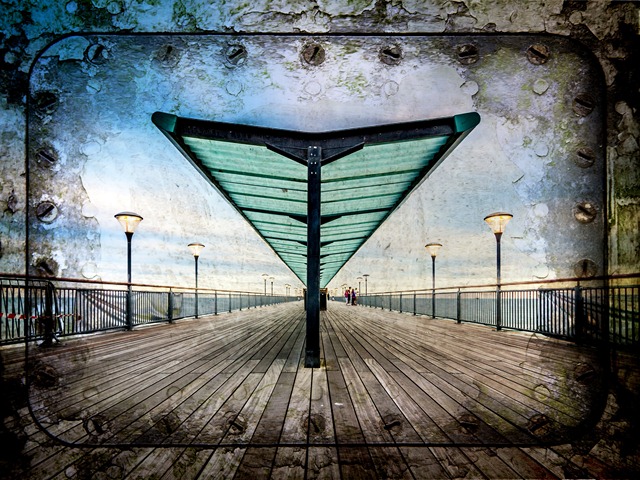
In the photo above I added a colour image as a new layer above the grunge border. Combining the two images is as simple as changing the layer blending mode to Multiply. You might need to use the dodge and burn tools and a levels adjustment layer at the top of the layer stack might be a good idea.
I’d also suggest using images which have lots of sky, large areas of simple colour/tone or lots of nice blurred parts in the photo. Basically a photo with lots of fine detail tends not to blend so well with a textured template like this.
If you create a photo using the Friday Freebie then let me (and everyone else) know by leaving the link in the comments below.
Usage rules
The image is copyright Gavin Hoey 2013. Use is limited to any personal, non-commercial purposes. Please share the Friday Freebie by linking back to this page. Do not redistribute the original image without my permission.
Download instructions
Click the link https://drive.google.com/file/d/0B_Mmmm3K1utNZEx4MEdDNEJldkU/view?usp=sharing
1. Click the Download button 
2. The download should start automatically
This is fabulous. Thank you so much for sharing.
Very cool. I like this one even better than the last one which was awesome.
I posted a couple of my attempts to use the frame on FB:
http://www.facebook.com/photo.php?fbid=3352665105942&set=a.1464519223475.2058242.1548341933&type=1&theater
http://www.facebook.com/photo.php?fbid=3352652905637&set=a.1464519223475.2058242.1548341933&type=1&theater
Sorry Gav, the File Info does not appear whe I open the link. I’ll try another time. Great border though. Nice work.
Lenny, If it works as it did for me a few minutes ago, when you go to the link, just to the upper right of the image of the frame, there is an icon of an arrow pointing down with a horizontal line under it. It’s right next to the trashcan icon. Click on that arrow pointing down and you should be able to download the file.
Regards,
Patti
Thanks Gavin for this freebie frame, I have had a great time playing with different effects, here is one which I have pasted on flickr 🙂 http://www.flickr.com/photos/52963511@N07/7473065804/in/photostream
Perhaps off topic, but how long since your last video (you coulda made one for this… puts it on topic). I’m missing them. Do I need to buy another t-shirt to so inspire?
2nd shirt ordered. Your turn. =]
Thanks for the order Dave. New photography/Photoshop videos really are coming, I promise. They may be a few more weeks away but the wait will be worth it 🙂
Just saw that you’ll be doing things with a well known NYC outlet. Congrats there!
Hi! Re: Lenny! If you are using Chrome, the link did not work for me, either. The link was just moot. I was able to get it to work, though, with another browser. I have IE-Tab for Chrome, but, FF may work, too. I see this alot. That’s why I have the IE extension. FF won’t even open on my pc without freezing up.
As for the frame, THANK YOU!! I love the grunginess of it!
Su
I am a little late, to the Friday Freebie #2, but here is the link to the posting!
https://www.facebook.com/photo.php?fbid=481976015163713&set=a.103436069684378.7787.100000539572304&type=1&relevant_count=1&ref=nf
Boscombe Pier! Not so very far away from me. I am really enjoying your video tutorials and this web site. It is taking my photography a step further. Thank you.
Good Morning California time,
Just used this template for a late night, High ISO (12,600 ) photo shoot. Thanks Gav, Really set off my image.
https://www.facebook.com/photo.php?fbid=1435099263369087&set=a.1435099163369097.1073741837.100006070811639&type=1&theater
Thanks for sharing Will 🙂
A try with this background.
Thanks to sharing Gavin
A link to the pictture
http://www.photos-lys.fr/freebees/Obturatix_01.jpg
Thanks Gavin, I used your frame for this pic on my 365 project: http://365project.org/dibzgreasley/extras/2014-04-10
I think it goes well with the abstract photo!