Here in the UK snow is something we get once or twice a year, which makes it a fairly rare event round these parts. So whenever snow arrives, everyone rushes out to build snowmen, go sledging and record the event with their cameras.
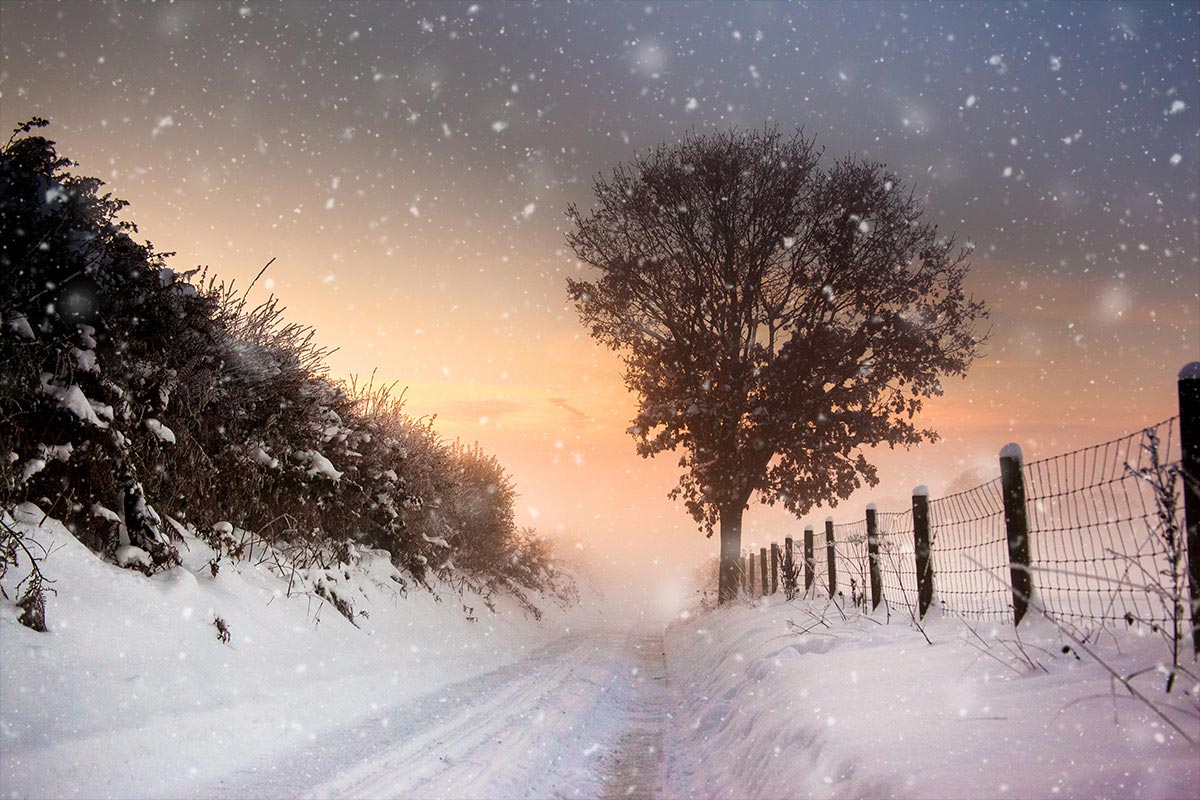 Now I realise some of you get snow all the time and some of you never see snow from one year to the next, but don’t let that stop you enjoying this weeks Friday Freebie.
You can download the action here: instant-snow
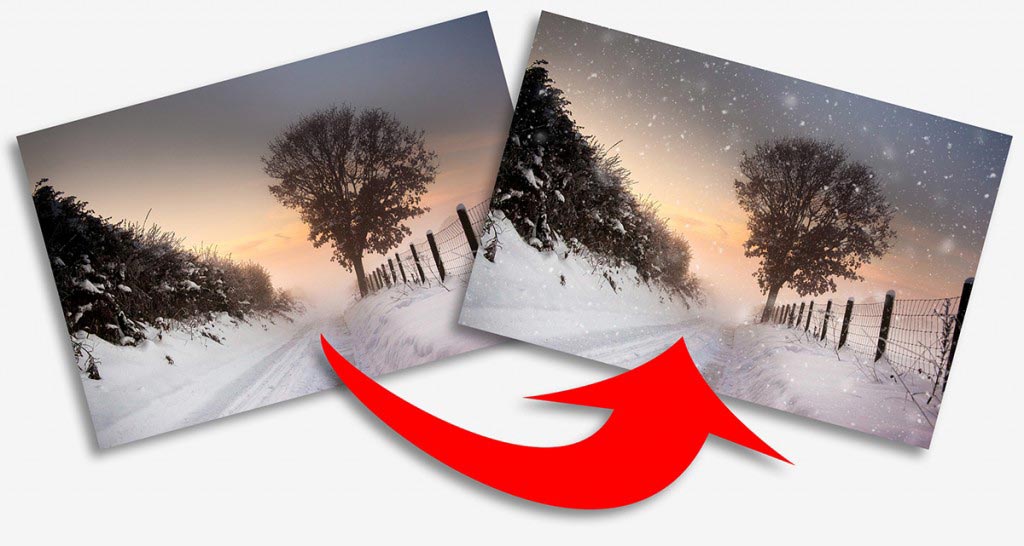
This is a one click action, so once you’ve unzipped it and installed it, you only need to hit the play button. The first thing the action will do is to make a copy of your photo and it’s the copy that gets the effect, leaving your original photo untouched.
The action will make three layers of snow and I’ve left all three layers active at the end of the action. That means you’re free to alter, adjust and tweak the snow in numerous different ways. Another nice feature of the action is the random nature of the snow. Put simply if you don’t like the snow the first time you run the action, just close the image down and run the action again and the snow will be different.
Usual rules apply:
The action is copyright Gavin Hoey 2013. You may use it for personal, non-commercial purposes only and please do not redistribute without permission. There is no support offered with this action and you use it at your own risk. Thank you and enjoy.
Cheers for that Gavin,
Great Action & well timed!
Thanks again Gavin
When it comes to video tutorials you are head and shoulders above the rest. Thanks for all you do. Here’s my attempt. http://www.flickr.com/photos/76331241@N05/8392104500/in/photostream/lightbox/
That’s a great choice of photo for the action David 🙂
Thanks for the action, Gavin. I can’t wait to add it to my PSE 10 and give it a try. Where I live, it hasn’t snowed since 1939.
Thanks for sharing, its like that i Norway too – its soo sad!
Thanks Gavin for another great Friday Freebie.
Loving this one. Please take a look at my shot with the action applied.
http://www.flickr.com/photos/garykenyon/8391412043/
Thanks
Gary
Thanks Gavin, other shot posted now 🙂
Gary
Thanks Gavin for another great Friday Freebie.
Loving this one. Please take a look at my shot with the Instant Snow Action applied.
http://www.flickr.com/photos/garykenyon/8391426161/
Gary
Thanks Gavin,
works great.
http://www.flickr.com/photos/focusffs/sets/72157632549065221/
Hi Gavin, Nice action. I have used it on my shots from Wimbledon Common this morning.
Cheers
Jon
Great Action!
Thanks for sharing your talent.
Thanks Gavin, took some photos today in the snow so just about to add your action to them.
Fabulous action Gavin! Love your work.
Sir Gavin, Lord of the Friday Freebie,
On behalf of my computer and myself I would just like to say [ Thank You] one more time and because of you Gain, I look forward to Fridays.
Thanks, Gavin! This will be fun to play with. Your generosity is appreciated!
Brilliant thanks Gavin!
Hello Gavin,
at first a huge compliment on your blog! I came across FStopperst on your site.
You present all your themes totally understandable human but also professionally.
And then there is something for free … rihaaa: D How cool is that?
And such wonderful tool!
I had as one of my “learning issues” soon snow on the program … wanted to apply it to an actual picture, but at the end a
i was a little bit lazy. ,-D
I have now done with your action and that result is shown here:
http://500px.com/photo/23656703
Thank you and do definitely keep it up!
Greetings from Germany
Christian Wolf
PS
If you want to i can link your blog entry in my prescription of the pic? Is there a tut that i can purchase how u create the action?
Just in time……. thanks, Gavin.
Last week I took this picture of my dog, and yes…. it was snowing, but not enough. Now i’ve got 30 % more snow :-).
I dragged the middlesnow layer into the original file and just dropped the opacity a few pennies. Thanks again. Grtz, from snowy Holland.
http://www.debroampsehei.nl/gallery/main.php?g2_itemId=2698
Awesome action, really looks like real snow. Its a good addition to normal snow photos, thanks a lot 🙂
Keep up the awesome work!
Great pointers. Thanks.
Hi Gavin I’m all for Actions but i like them best of all when i have made them myself, I have a Mac and i have been trying for a Snow effect. Van Dar Lee seems to be just for windows.
I have downloaded the snow effect you have here and it works well would you have a pdf of it.
Thanks James
Sorry James, no PDF from me but feel free to make your own.
Perfect , head and shoulders compared too the rest. thanks
works great Snow Action thanks you make me look good lol
Paul
Hi, I am running PS CS5. I downloaded the zip file, opened it and photoshop started up. Where is the snow option? When you said “Hit play” what did you mean, am I being a ding-bat!
Love your tutorials, I have learned a massive amount.
Thank you!
Firstly did you load the action into Photoshop, once loaded drop down the windows tab, then under that you should see the Actions label. When you open that the Snow action will be at the bottom of the list. Click on the instant snow folder then click on the Snow folder. Then press the play button underneath and hey presto.. instant snow. If your not sure how to load the action into PS check this out. Hope it helps. http://www.youtube.com/watch?v=AZ2OR6gtl-0
Thanks Gav, nice handy action to have especially round Chrimbo time.
That’s great! unfortunately we never see snow here in Mexico. Cheers!!
Found your site and tried a few thing, this is one;-http://www.flickr.com/photos/72339061@N05/
many thanks
I just discovered your tutorials and they are most informative. I ran across this one, Instant Snow, and just tried it. I love snow. I applied it to a photo taken in Yosemite. It was snowing but the snow did not show in the photo well. Applying your snow effect has added the snow that I was trying to capture. Thank you very much for this. Love it.
http://www.flickr.com/photos/17705330@N08/
Hi Gavin, i used your snow action on a club competition print… Southwick…where you gave a great talk recently, and it was awarded a full 20 by a highly regarded local photographer / judge Ken Scott aka “Touching the Light”….. Thanks for all your hard work helping us mere mortals.
Link to the image: http://www.flickr.com/photos/24814887@N06/8641821113/
A worthy winner for sure. Well done 🙂
Hi Gavin…you work is great 😉
http://www.flickr.com/photos/jonas400d/8865857271/
Wow. Great action. Thank you for sharing for FREE!!
Thanks Michael, it’s one of my favourite Actiobs too 🙂
Thank you SO much! I’m using it on a non-commerical school project. It’s not easy to take a photograph to theme ”winter portrait” when there’s no snow. So thanks again for saving my grade!
As always thanks for everything Gavin!!
Thanks for this – my effort
https://www.flickr.com/photos/70350770@N08/15626091569/in/photostream
Is there a way to receive the Instant Snow preset? I tried to download it , but my computer will not open your file.
You’ll need to unzip the file (Right click on a Windows PC) and then install it into to Photoshop (drag and drop it onto the Actions panel).
Sadly I cannot get this to work.
Love how it looks though!
It should work OK Katy. You’ll need to unzip the file and then drag & drop the action right onto the action panel in Photoshop (or Elements 11, 12, 13 etc)
And another go – love it
https://www.flickr.com/photos/70350770@N08/15200194973/in/photostream/
My second effort – I love the effect
https://www.flickr.com/photos/70350770@N08/15200194973/in/photostream
Thanks so much
Thanks Gavin Hoey
I downloaded the snow effect ………….. and stick it in the photoshop
Where can I find it? Plz.
Best regards
Saeed
Hello. Your brushes are wonderful. Thank you very much.
I have one question (stupid) – how do you instal snow preset?
Thank you 🙂
Just unzip the download and drop the action onto Photoshop’s Action Panel 🙂
Thanks Gavin…came in handy for this photo…
https://www.flickr.com/photos/65847465@N02/16410908965/
Bob
Thanks soooo much!! Great action, I just add a layer to each and tweek as needed. Greaaat job!
Thanks
Wow thanks for sharing this great action,ive got alot of snow photos that I have taken over the years but it wasnt snowing on most of them,now I can add snow to make the photo more atmospheric 🙂
Here are a few ive created so far.
https://www.flickr.com/photos/d2mac60/sets/72157651697120182/
Thank you so much!
Super great action Gavin 🙂
Gavin, I have been searching for a realistic snowing effect for some deer I photographed in the snow. Yours is the best by far that I have seen. There are some horrendous ones out there. Thank you so much. Just signed up to your newsletter as well.
Thank you for this fun action!
HI Gavin & Team. Just a quick note to say thanks for this action.I used it here for this years Cheesy Family Christmas Card.
Gaz
https://www.flickr.com/photos/46559688@N08/23087096449/
Thank `S 🙂 🙂
Fantastic action really looked great So happy
Brilliant! Thank you.
Hi Gavin, a great fun action to play with, thank you.
Hey Gavin, will this work in Gimp? I’m too poor for PS.
Cheers Gav… Keep up the great stuff and brill content / Topics
Thanks for the Snow effect will be using it soon as I get a chance on the right photo.
Thanks Gavin, you’re a great teacher and an amazing photographer..
Thank you for creating this great action, I used it for my 2017 greeting card 🙂
https://www.flickr.com/photos/hhamad/31882860932/in/dateposted-public/
Thanks for a really great action! Is it just me or does the action downsize the picture? My original picture is 7360 x 4912 pixels, but after I have run the action the picture is 1708 x 1140 pixels.
Many thanks Gavin for your Snow Action – really useful for me in Australia as it is currently 35c and snow is the last thing we can hope for at Christmas – Peter
Hey! Thanks for the free snow! Can i use it for Lightroom?
No, sadly there’s no brushes as such Lightroom.
Thank you. Gracias, muy amable. me ha gustado mucho y me ha sido de gran utilidad. Un saludo desde España
Thanks for the insperation 😉
http://markusbock-fotografie.de/wp-content/uploads/2017/01/IMG_6493MBLOGO.jpg
Thank you Gavin x
Thanks Gavin for your work and for sharing this action !
Hello Gavin
Thank’s for the great snow action.
It works amazing !!!
Greatings from Belgium. Patrick
Thank’s Gavin for your tutorial and action, then all is free.. you are awesome Photographer for me
Hello Gavin
many thanks for your amazing snow action !!!
Thanks sir Gavin for the amazing snow action..
Thank you so much! This worked perfectly!
Thank you for allowing the download…….looks really real.
Thank you very much for this amazing action. It’s the best I’ve seen for adding snow.
Much appreciate!
Rich
I love your work and all your help!! Thank you so much.
ATN-file installing wont work in Lightroom —> LR-file cause i use it in Lightroom!? Help!
Photoshop Actions won’t work in Lightroom.
Thank you, Gavin! Useful action. Happy Holidays, cheers!
Hi Gavin, luv your online lessons more than any others! You are the real thing among so many who haven’t a clue!! That comes from a Professional Photographer of 30 years who still wants to learn new tricks! Thank you 🙂
Hi Gavin: While one has to go quite a bit south of Sydney to get snow (and not in December, mind you), this will allow me to at least pretend I can. Thanks for the snow action!
Gavin, yet another wonderful tutorial, many thanks and for your useful snow action
Regards,
John
Thank you for sharing this action, I love this effect it is very realistic, thank you Gavin
I used the instant snow action a few times on different images, but recently I got to shoot outdoors when there was actual snow on the ground. I applied the action and this is the result. I love it!
https://flic.kr/p/FkDT91
Fab video and a great action… fun all round https://flic.kr/p/23Z2wLM
Truly a great teacher and photographer. Someday I hope to
be able to obtain photos a fraction as well done as Gavin.
thank you sir .. im from Malaysia like ur atr work very much ,, the best ..
Thank you Gavin sir. I am from India and I have learned a lot from your videos from YT, Your simple tricks and ideas inspires me and forces me to push my boundaries to create something new. Thanks sir for being there for us and teaching us through your videos.
Lovely and realistic effect. I’ve used it here: https://www.flickr.com/photos/60950761@N02/45264652294/in/dateposted/
Great Action thanks Gavin. I’ve been blue-tinting some winter scenes then adding your snowflakes. Looks great. I found you can paint out unwanted flakes using a black brush. See my pic at: https://web.500px.com/photo/283639777/winter-farm-by-james-burke/
thank you so much sir
Thank you for this. Your videos are great man! You’ve got a new fan.
Thanks! Much appreciated!
Thank you Gavin, perfect action. I love your Adorama videos.
I retired from the US and now live in Peru. Where I used to live we got a lot of snow. Luckily I took a lot of pictures of this. Now when my grandchildren ask what snow looks like I can show them. Last night I used this action and the other Snow Action 2 on one of the photos. Not even I could tell which was the Photoshop made snow from the real. It matched the pictures perfectly. Thank you so much for this wonderful addition.
Thank you Gavin, great action, the effects are so realistic!
I’ve loved using your Snow action and it worked fine until lately: every single time I use the action now, the entire computer shuts down. I have no idea why; has anyone else had that happen or is it just me??
Thank you !