 Over the next few weeks I’ll be posting some tips on how to squeeze more speed from your computer to make Photoshop run faster. Of course you may not be aware that your computer could run faster or even what the benefits are. In which case let me put it this way… The faster Photoshop runs the more enjoyable it is to use.
I use two PC’s on a regular basis. Now I wrote about upgrading my main PC a while back and its speed is unbelievable. My second computer however, is a small laptop that I use on locations and at talks. Recently I’ve had to use it quite a bit but compared to my regular PC it was painfully, frustratingly, annoyingly slow. Working with even medium sized images showed up its lack of power making using Photoshop a bit of a chore.
The Speed Test
Of course that was just my perception of speed so what I wanted was hard facts. Is Photoshop on my laptop really slow or am I impatient? So to put Photoshop through its paces I’ve created an action that will push it hard.
If you fancy testing you’re Photoshop then you can download my Speed Test action, grab a stopwatch close any images and run the action.
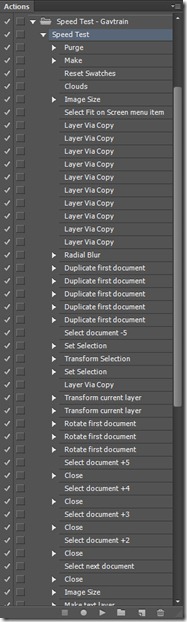
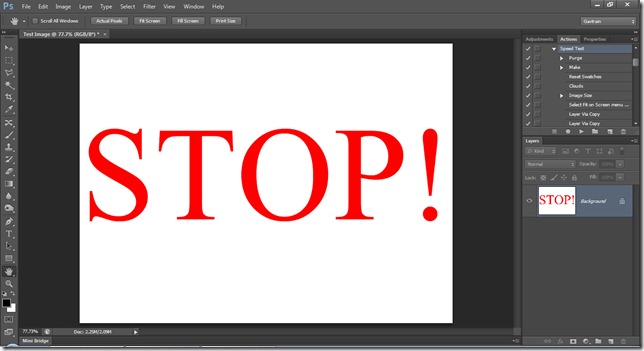
You can get an idea of what the Speed Test Action does by looking at the screen grab. Basically it creates an image, up samples, applies a few transformations, creates layers and fills Photoshop with data to really make it work hard. It will stretch the system RAM and scratch disc before tidying everything up and saying STOP! The faster your computer the quicker the action will play through.
The Results
I ran the speed test a few times and then averaged out the results. Adobe claim Photoshop CS6 is faster then CS5 so I also wanted to put that to the test, so I ran the same speed test in both versions.
Laptop: CS5 = 157.5 Sec CS6 = 139.5 Sec
Intel i5 with 8GB Ram
Desktop: CS5 = 36.5 Sec CS6 = 27 Sec
Intel i7 with 24GB Ram and SSD scratch disk
OK so Adobe were right, Photoshop CS6 is faster then Photoshop CS5 but I was also right, my laptop is much slower then my main PC. So I’m left with three choices…
- Accept that’s the way it is and get on with life
- Upgrade the hardware where possible
- Retire my laptop and buy a new one.
Option 1 isn’t my style and option 3 is tempting but expensive. Stay tuned to see how well I get on with option 2.
If you’ve run the speed test on your computer add your results to the comments below. I’d love to know PC or Mac i3 i5 i7, how much ram and of course the time.
Hi Gavin,
I guess this action is only compatible with CS5/6 and won’t work with Elements 10?
Also do you plan on doing more tutorials for Elements? Not everyone can afford to buy CS6.
Mark.
Good question. There’s nothing in the action that Elements 10 can’t do so it should work. Be prepared for a long wait as Elements 10 is a 32bit program which means it can only access around 3GB of RAM even if you have a lot more.
Whoops, tested on my iMac, 11 mins 52 secs. CS4 I was just thinking that PS hung around now and again. Help!!!!!
42 seconds for my desktop PC running CS6 processing a 7MB RAW image.
My PC has an i5 3.4GHz overclocked to 4.2GHz. 16MB RAM, SSD for main drive with a HDD for scratch disk.
In future I’m planning on doubling the RAM, a 1GB minimum graphics card and a second SSD for the scratch disk.
Hopefully should make it a little quicker….
Ian
Sounds good Ian. Was the speed test action doesn’t use RAW files so I’d be interested to know how fast that runs too.
Using a 4.17MB Jpeg, basically the same time to process.
Although I built my PC to run Photoshop, I’m a little shocked at my results. I think it’s my ancient hard drive letting me down though.
It took 1:40 all together before it said “STOP!”
Specs:
AMD FX-4100 @ 3.6GHz
16GB DDR3 RAM @ 1333Hz
168GB hard drive (Too old)
Any ideas on how I could improve my system to get speeds similar to Gavin’s? I’m thinking about upgrading the AMD FX-8150 which is an 8-core CPU and getting a fast high capacity hard drive. But I’m now thinking SSD would be the way to go again…
Thanks for this action, Gavin!
A faster CPU would certainly help but I’d start by upgrading the hard drive to a SSD. It make a HUGE difference to the speed as I hope to show in a post next week 😉
Thanks for the advice Gavin! I certainly can’t afford a CPU as good as your i7 but I’m hoping the AMD FX-8150 I was talking about will do the job!
I was told that SSDs, although lightening fast, aren’t worth the price you pay. Apparently their life span is shorter as they decay everytime they are written over. I’ll have to think about this one!
Thanks for the advice, again!
Also check how much ram you have dedicated to photoshop. My Mac has 20 gigs of ram and I give photoshop 16 gigs when it runs.
Hmm A Painful 5m.47.9s on pc i7 920 CPU 8GB ram ?? that’s just nasty :))
Hi
I also use an i7 920 but I have 24 Gb of pc1600 ram.
Make sure your scratch disk is not your system drive, so in your case just adding another drive as a scratch drive will speed you up. Rams important, the more the merrier, as long as you have an OS that recognises it.
I just ran the test and managed it in 46.8 seconds 🙂
Photoshop rules!!!!!
263s on a Windows 7 Laptop with Core 2 Duo @ 2.4Ghz, 4GB ram. Really showing its age now…
PC. Intel i7 2600K O/C @ 4.2GHz, 16GB Ram, OCZ Agility 3 120GB SSD, MSI N520GT 1GB DDR3 GPU. OS Windows 7 Home Premium.
Photoshop CS6
Speed Test Time:-
Run 1: 33.1 Secs
Run 2: 31.8 Secs
Run 3: 30.9 Secs
Think I may benefit from a better GPU as I know CS6 uses the GPU, also a bit more RAM and I am thinking about another SSD running in RAD with my OCZ.
Interesting; I just run the test again but I done a disc clean first and then I shut everything down first except for Photoshop and my time dropped to 24.5 Secs!!
CS6 with a 5184 x 3456 20MB RAW image 2:29
W7 Quad core i7 2.9hz with SSd and 8GB of Ram
Took about 5minutes in CS5… really should get a new one…
Interesting test! I got 1:39 with these specs:
intel i7 920 stock
12GB of RAM (1600 MHz)
GTX285 GPU
HDD
Is it better to get a laptop or a desk top. seems like desk tops are way faster? was looking into getting a laptop to do photoshop cs6 any help in which one I should be looking at? thanks
A fully loaded new desktop will always be quicker then a laptop but a modern laptop with plenty of RAM, an SSD drive and a dedicated graphics card will out perform a desktop PC from a few years back.
Hello Gavin, I’m about to get a 15″ MacBook Pro with an intel i7 2.8Ghz with 1TB SSD, 16GB RAM and a 2GB NVIDIA 750 Graphics Card, everything sound great but it is still a laptop… you thing Photoshop CC 2014, Lightroom 5 and The Nik Collection will perform fine…?
14 MB PSD file
PC With Intel Core 2 Duo CPU, 3.00 GHz, 8 GB Ram
CS5 = 122 seconds
CS6 = 105 seconds
PS:
Forgot to mention that I upgraded the HD several months ago to OCZ Vertex 2 240 GB SSD drive.
I think I need more RAM now.
With all the talk about how slow LR4 is, maybe you should design a test around it.
On my PC Laptop AMD Window 7 PS6 8Gig ram a sorry 14 Min 36 Sec. Now Thats Slow.
Ran it on my 27″ imac I5 (i think) with 12 gb ram…
9.6mb D4 jpeg
123 seconds
Hope this info helps !
Opps forgot to mention I am running CS6
It took my computer 9 minutes 50 seconds to finish (590 seconds) to finish.
I bought my PC mostly for typing and document-editing and presentations so it is not super powerful so here is the spec:
Intel Core 2 Duo T6600 @ 2.20 Ghz (2 CPUs), ~2.2Ghz
RAM: 4GB (3.2GB usable)
Graphic Card: NVIDIA ION 256MB RAM
HDD: 640GB 5400 RPM
I’m running CS6, by the way.
Wow Thought my MacBook pro was running slow.
4.27
That is slow.
OS.X
2.3Ghz Intel Core 1.7
8GB 1333 Mhz DDR3
any other MacBook pro going this slow.
Will have to get it looked at me thinks.
Just re ran the test after contacting Apple support, Now running at 2mins.
Intel i7-3770k
G.Skill TridentX 32Gb 2400MHz
Nvidia Geforce GTX 560 Ti
2x SSD Samsung 830 256Gb in RAID 0
In my daily configuration (CPU overclocked at 4.6 GHz) it takes 20.3 sec, but takes 19.2 sec at 4.8 GHz.
I forgot, CS6 🙂
This is really interesting as I am looking to build a photoshop pc, shows which parts make a difference!
If I had to suggest what part to change in which order, I’d say:
1) CPU (that very likely means also a new motherboard)
2) SSD instead of mechanical drives
3) RAM (if you have less than 8Gb I’d say to take a 16Gb kit directly)
4) Graphic Card
MacBook Pro 2GHz i7 16Gb: 81 sek.
CS6
Same but with an SSD. 45 sec.
well my CS5 time was 40.5 with I5 2500k with 3.4ghz 24gig ram asus rampage III and 3 ssd 240gig with a 1000 watts of power 2 nvidia gtx580 fps my computer is very similar Gavin
Interesting blog Gavin
I’ve recently upgraded my PC with one built to my affordable specification namely i7 – 2600 12GB RAM SSD scratch disk.
Win 7
Using CS6
1st test 48 secs
2nd test 46 secs after restart
Looks like I might need to purchase a bit more RAM if I wanted to improve on the speed but I’m pretty happy with my set-up at the moment. I’d seriously recommend a SSD to anyone building a new PC, it really does make a difference and really worth the money.
Does a discrete graphics card helps with photoshop? I know that new i5 , i7 cpus have an onboard gpu which supports opengl.
A discrete graphics card (or dedicated graphics card as they also called) will indeed help by allowing the CPU to pass on the graphics functions and other operations.
Can someone with the monster setups please run this action with and without GPU openGL/openCL, I’d like to know how much a GPU adds. thanks 🙂
my old quad core Q6600 took 20 minutes (32 bit CS5 4GB RAM slow Disk…)
I’ve just run the test again, with Graphics Processor disabled. However, it took the same time, about 20 sec. The thing is that not every task is really parallelizable. Not everything in Photoshop provides both algorithms for CPU and GPU, it would not even be possible. You do get a great benefit from fast GPUs but only in those tasks where a big amount of data is to be processed in parallel. It’s proved that with few data to process, CPU is even faster, GPU aren’t as fast as 4 GHz or so for “single thread”-ed workloads. As far as I know, filters like “Liquify”, for example, are really accelerated by the GPU. As Gavin said, this speed test mostly stresses RAM and scratch disk (and CPU of course).
thank you very much.
saw this on adobe site, listing all the GPU accelerated features on CS6 and earlier: http://helpx.adobe.com/photoshop/kb/photoshop-cs6-gpu-faq.html
33.6 seconds on a 28MB Canon RAW file.
Just assembled the PC, will post about it very soon.
Core i7 2600K running @ 4 GHz
G.Skill 16 GB DDR3 1600MHz RAM
Kingston HyperX 120 GB SSD
2 x 1 TB WD Black @ RAID 0
GeForce GTX 570 OC
Ran the test again and got 30 seconds this time.
Oh, forgot, CS6
Very Interesting.
With Firefox, Thunderbird, Winamp, eMule and some other apps running: 32.02 seconds.
With a clean restart: 18.6 seconds.
Specs as follows:
Photoshop CS6 Extended
Intel 3930K @ 4.6Ghz
64GB Corsair Vengeance DDR3
System disc: 2 x 240GB Corsair Force GT RAID0
Scratch disc: 2 x 120GB Corsair GT RAID0
OS: Win 7 Pro x64
Graphics: 2 x ASUS GTX 680
PSU: Corsair AX850
Oh, woe is me. I canceled out after 10 minutes and only halfway through the action.
4+ yr old iMac 2.66 dual core 2 Duo processor, maxed out at 4 GB 800 Mhz RAM
OS 10.7.4
PS CS6
I bought this computer before I started doing as much heavy photo editing. This helps to explain why I get so frustrated and impatient at times using LR4 and PS. I often find myself stopping before I’m really finished, because I get tired of waiting.
Thanks for this, Gavin.
Hi Gavin
My computer got to the stop sign at 30 seconds.
I had my computer built by ADK company in Kentucky, USA. I-7 2600 CPU at 3.40 ghz , 16gb ram 64 bit Windows 7 sp1
Photoshop cs5 extended
thanks for the test action
I think you are a friend of mine because I have followe many of your tutorials and find you to be a knowledgeable person who freely shares his talents.Thanks a lot
Ray Perry, Hackensack, New Jersey, USA
56 seconds
Win7
PS CS5
Intel i5 Quad Core 3.0GHz, 16GB RAM, Seagate 2TB HDD and 1GB NVIDIA GT520 Graphics Card
Useful to know I upgraded my PC with some half decent kit earlier this year 🙂
1:42
CS6
i7 stock
GTX 570 (in use by PS)
16GB Ram
120GB SSD (as scratch)
Win 7 Pro
I don’t know what I expected but after seeing the results I somehow expected it to be faster. Nice test though.
Time for a new Desktop. 27mins 50 secs
Intel Core 2 6400 @ 2.13Ghz RAM 4GB
A new speed record Simon but not in a good way 😉
Wow! You do. It took my computer 9 minutes 50 seconds to finish even though my desktop is fairly new but because of its weak graphic card it took so long.
127 sec on my i3 2.93GHz with 11GB 16bit Win7 CS5.1
116 sec after I seen I had background prog running like Outlook and Chrome…
Well started the action, made a cup of tea, action still running. Took my dog for a walk, action still running. Then had some lunch action still running, well not as bad as that but boy it took ages.
I suppose its because my laptop has only 4gb of RAM but until now its never bothered me but now it is, thanks Gavin LOL
Especially on cs6 people don know the advantage of a good grafics board.
If you have the GPU option on, you will see a great difference, all so check history an cache, and as mention before how much memory do you “let” Photoshop use…also use a different disc to scratch, a different participation is not a different disc.
And remember Photoshop 32bit only sees 4gb of ram … 64 bits sees the rest.
Gav keeps up the good work
26.1 seconds
Photoshop CS6
Windows 7 Pro (64 bit)
i7 3930k @ 3.2GHz
Asus Sabretooth X79 Motherboard
32Gb RAM
2Gb Quadro 4000 Graphics Card
Corsair Hydro H80 Water Cooling Kit
2 x 2TB Western Digital Caviar Black HDD
120Gb SSD but using the mechanical drives for the scratch disk
Antec 1200 V3 Gamers Case
It did not go too well…
It got to 220 seconds and could not be completed because the scratch disks were full.
It was sort of expected seeing that the PC is almost 8 years old.
2.5GB RAM
Intel Pentium 4
Macbook Pro 13″ x 16G main memory
OSX Lion
CS6
102 sec
Thanks for helping me to justify a new PC to the wife!
768 seconds!
AMD Phenom 9550 Quad Core 2.2Ghz
4Gb Ram
Win Vista 32bit
PS CS5
I have a new box coming next week, overclocked i7 @ 4.2Ghz, 16Gb of 1866 Ram, fast SSD drive and general all round loveliness. I post a new comparison speed once I get my hands on it. 🙂
22 minutes for me lol but I have a new i7 Macbook Pro on order 🙂
This was CS5 Macbook 13″ 2.0 Core 2 Duo 4GB Ram Integrated graphics. Nearly 4 years old but has served me well 🙂
Thanks for the post Gavin great exercise.
Tested my old computer first with a whopping 14 min 36 secs. Understandibly I’ve upgraded and only use PS occasionally.
Even my new computer gave me a result of 4 mim 9 sec.
Intel R Core i7, 950 @ 3.07Ghz, 6Gb RAM.
I will be looking forward to your following posts on upgrading
First time I tried to run it I gave up after 24 minutes (still on the first rotate). That was painful
Rebooted and ran it again with no other applications open and it finished in 5:14
Mac Pro Quad Core Xenon
4-core
2.66 GHz
6 GB Ram
10 GB Scratch Disk
2:41
Mac Book Pro
2.4 GHz i7
8 GB Ram
Thanks Gavin
Tried it on my iMac 2007 with 4Gb RAM all other apps off 11m 23sec, I would be well happy with 1m 39.5 s ! Time to start saving !
Since I got appalling speed on my iMac (11m30s) I invested in a 2nd hand MacPro 2 x 3ghz Xeon Dual core/6gb ram loaded CS6 and the action and timed at 7min30secs since added a SSD and and additional 10Gb RAM and down to 1m 29secs.
Soon to install 2 x quad core xeons and maybe more Ram, and a faster Graphics card.
I agree Gavin the SSD has seen the real performance increase. More to come though!
Newer MacPro now with 2 x 6 core Xeon 3.06Mhz and 24Gb RAM down to 31 secs
Upgraded Graphics card due to failure GTX680 2Gb flashed and 40gb RAM down to 28sec with CC15.5
Mac Pro 2013 12 core XEON with D300 64Gb RAM
20.44sec
Great idea for a test
Imac Intel i5 2.7ghz 12gb ram running 10.7.4 OSX
CS5 67 seconds
Will test my i5 macbook pro shortly.
Hi
Great article, have a PC which i custom built a few years ago specifically for photoshop, lagging a bit these days, want to get an i7 beast but holding off for the moment till funds permit!
Current setup is:
Intel Core 2 Duo E8400 @ 3GHz, 4GB Ram, Win7, SSD (best upgrade i ever made!)
Action runs in just under 6 mins, which is surprising really. Have to see how it runs on my i7 at work! Using a 10MB JPG.
Work PC:
HP Elite 8300
Intel Core i7 3770
8GB Ram
120GB SSD
integrated HD4000 graphics
Using PS Express 10 on this. Ran in about 60 seconds. barley touched the sides of the i7 (as per Pauls comments below. Sure i read something recently about PS not using all cores for a reason. Check this link out: http://helpx.adobe.com/photoshop/kb/optimize-performance-photoshop-cs4-cs5.html)
Some things take more advantage of the cores than others. Similarly some things take more advantage of the GPU than others (notably 3D work)
Looking forward to getting my home PC under the minute mark! $$$$$$$$$
Ed
Test system
Intel 3960X @ 5000MHz
64GB Corsair DDR3
System disc: 1 x 240GB Kingston HyperX
Scratch disk 1 x 120GB Kingston HyperX
OS: Win 7 Pro x64
Graphics: 1 x ASUS GTX 680
17sec to complete test
Great benchtest Gavin for all Photoshop users, well done on this one mate.
I have found the test quite interesting, even though the GFX is doing some processing it looks like Adobe still only utilize one of the cores on the CPU, now if they were to investigate the coding and make use of all cores of the CPU we would see more data throughput and a better result.
Its without doubt a CPU bottle neck, increasing the CPU speed has a direct result on how much calculation can be done in the given time, if we could utilize all the cores at a given speed then this would be even more beneficial.
Without doubt having a 64Bit operating system that utilizes all the memory is beneficial, as this test used around 15GB of memory.
The use of an SSD is paramount fast read and wright access time is far greater than a conventional mechanical hard drive.
If you can try and get Adobe to investigate multi-core threading for their programme that would be great, as said if we can put the same amount of data though four or twelve threads rather than one we would see a dramatic increase in performance.
Keep up the great work, its things like this that make life better for all of us.
Would also be good to see some more results from Mac users please.
hey, see comments above on multicore CPU etc.
ed
Ed thank you for your post, but sorry to say PS is only using approx. one or two cores available on the CPU, when the test first starts you see around 80% load on the CPU but this is due to start up load, you will then see it settle down to around 10% under load conditions.
I do understand that the CPU has to have headroom to be able to work, but if we can have a CPU running at 100% load on all threads and still have a working PC, there is no reason why PS should not be able to utilize 80%-90% of the load on the given amount of cores a CPU has.
For whatever reason there seems to be a lack of software support on most manufactures side for multi-threaded CPU’s, we have had multi core CPU’s for as long as I can remember now and given how long they have been around it is about time the software made good use of the threads available.
To put it in simple terms, think of a hose pipe with water flowing at 80%; now increase the amount of hoses (cores/threads) in my case 12 threads. 12 x 80% = fills a buck much faster than one hose (core/thread)
Anyway thank you for your post on the subject.
Nice little test 🙂
Some interesting results, thought I’d ‘tweak’ photoshop to see if I could get more out of it.
Stock CS6: 2:33 / 153secs
Twesked CS6: 1:46 / 106 secs
Or by my count, around 70% improvment. Here’s what I changed:
Disabled auto-save
Turn off animated Zoom
Bilinear Image Interpolation
RAM Usage: 84% (up from 71%)
History states: 1 (down from 20)
Cache levels: 1 (down from 2)
The machine is running the following:
i5 760
8GB RAM
Nvidia GTX 560Ti
Scracth disk: 2 x 256GB 7200RPM drives in RAID 0
Obviously these settings are trading usability/quality for performance, but dependening on your task at hand, it may be useful to tweak CS6 one way or the other.
I mean 30%! Dang, where’s my morning coffee…
Took about 46 seconds here
Actually took me a helluva lot longer to find the stop watch on my phone!!
‘Only’ an i5 but I don’t think an i7 would have improved things as they’re hyper threaded (more use for video encoding)
16GB Corsair Dominator RAM @ 1887
OCZ Vertex 4
Velociraptor swap file disk
ATI Saphire 5850 Toxic GFX card
I’ve said it before and I’ll keep banging on about it..SSD are rubbish I/O. You need a fast HDD for swap!
CS5 and Win 7 by the way
Interesting test though, thanks Gavin
95.3 secs
CS6
Intel i5
8GB RAM
17min on a brand new lenovo t520i
intel i3-2350m
2.3ghz
4 gb ram
64 bit
help me out please… 🙁
I upgrade my laptop.
i have a
intel i3-2350m
2.3ghz
4 gb ram
64 bit
before it took around 17 min.
i upgrade and put another 4 gb of ram in it.
I went from 17 min. down to around 6 min.
i must say that is pretty drastic.
I also put a SSD drive in and had CS6 use it as cache, but that really didn’t help much.
48.2 seconds
Early 2011 Macbook Pro
2.2GHz Intel Quad Core i7
16GB RAM
AMD Radeon HD 6750M 1025 MB
750GB SATA HD
I think it did pretty well…oh yeah running PS CS5.1
it took me about 15min. after a restart over 20min… PS 5
hp pavillion dv7
4gb ram
32 bit
2 ghz
new pc or an update with a ssd and more ram?
How come I don’t see the “Stop!”?
I run the program, and nothing happens. All I get is the opening dark grey screen…..
Ok, got it to work in CS5.1 on my laptop.
-Intel i7 2.9Ghz
-8GB RAM
-Nvidia GT 640M
Took 1 minute 33 seconds OR 79.8 seconds
25 seconds for CS6
i7-2600K @ 3.40GHz (overclocked to 4.8GHz)
16Gb RAM
120Gb SSD system disk
Nvidia GeForce GTX 560
Built the system myself (1st build), cost about £1000, not including monitor, mouse and keyboard, all from one online supplier. Pleased with the result!
6yr old Win XP machine. Pentium D (3.2GhZ), 4G RAM.
10min 33s.
Have ordered a new PC so it will be interesting to see how that performs in comparison.
i7 2600K overclocked to 4.5GHz
16Gb RAM
240Gb SSD system disk
120Gb SSD scratch disk
Nvidia GTX 560 Ti
Windows 7 64 bit
Photoshop CS6
70% RAM usage
1 history state
20.4 seconds
20 history states
23.2 seconds
1000 history states
23.2 seconds
10% RAM usage
1 history state
20.4 seconds
20 history states
23.2 seconds
1000 history states
23.2 seconds
Using slow portable HDD as scratch disk
70% RAM
1 history state
21.0 seconds
20 history states
23.2 seconds
1000 history states
23.2 seconds
Using 120Gb SSD as scratch disk
70% RAM
20 history states
GPU acceleration OFF
20 history states
21.9 seconds
Unsure why turning GPU acceleration off speeds it up
just done it in 20.98 seconds
spec
ivybridge i7 OC’d fpr 4.7GHz
16GB 2400MHz ram
ati 6580 1GB GPU
128GB samsung OS SSD
60GB scratch disk
PS
12GB dedicated ram
60GB scratch
gpu acceleration on
well happy with my results 🙂
iMac i3 3.2ghz intel core
Running OS X V 10.6.8
With 12gb 1333mhz ddr3
1min 33sec
Hmmmmmm ? Have to chat to the finance manager. 🙁
🙁 lol 16.06 this has just wrecked my night 🙁
so much for buying a £1200.00 sony vaio laptop for photoshop
im gonna burst out crying any min haha awww wank i been stitched with a piece of crap
Win 7 x64.
i5
8Gb RAM
C: 1TB SATA 7200RPM
D: 300Gb SATA 7200RPM
PS CS5
Scratch Disk C:
Memory allocation 5gb
Time 4m 20 secs :o(
Moved scratch disk to D: and increased memory allocation to 5806Mb, ran test again: 2min 20secs.
A 2 minute improvement :o)
My kind of old Desktop got some good results in this test, assuming I dont have SSD.
Average time to run> 35s.
Core i7 920@3.6Ghz
16GB DDR3@1450Hz (2 x 8GB)
Scratch Seagate fastest DM01 7200rpm 64MB Cache running SATA2 (not green)
Ati HD4870 1GB DDR5
Mobo Asus P6T v2 DeLuxe
Ops, forgot to mention
Windows 7 x64 Ultimate
Photoshop CS6 85% of 16GB
New 2.6GHz quad-core Intel Core i7 Macbook Pro
8GB 1600MHz memory
750GB 5400-rpm hard drive1
NVIDIA GeForce GT 650M with 1GB of GDDR5 memory
Running CS5
Did it in 138 seconds so happy with that. Not as good as some on here but I could go solid state at some point.
Crash on my PC. Action stopped running mid-point and said:
Could not complete the radial blur command because there is not enough memory.
i7 – 860
4 Gb 1600 MHz memory
Windows 7 x86
Photoshop CS5 extended
Is there any step in the action that makes use of the GPU?
I wonder whether this benchmark is not flawed.
Obviously no benchmark is perfect, but this one seems to be almost entirely based on memory performance – or rather the amount of memory in the system.
The action fills Photoshop with lots of documents each with 10 layers thereby filling in a lot of RAM – all those with 4 GB rely entirely on scratch disks – therefore the terrible (10+ minutes) for all those with 4 GB.
During the whole action CPU performance on my 4 GB machine was never over 10% over 1 or 2 cores from the 8 available.
As such I’m not convinced this is a good example of real-life performance where, even as a pro-photographer, I never have 5 files open in photoshop each with 10x 35MP layers.
People running your benchmark will arrive at the wrong conclusion that their system is not strong enough @ 10 minutes completion time when in real life they probably would not see a massive difference with those able to complete the benchmark in 30 seconds. Again – because you are saturating at least 5 GB of memory completely automatically disqualifying those with 4 GB systems.
To continue making my point, if you had added a few layer and duplicate documents you could have disqualified completely those with an 8GB system, which will see their performance jump from 1-2 minutes to 10+ minutes as well. There is a set point in this benchmark when the system needs scratch disks and when it does not – and this point is arbitrarily set by yourself.
I love your idea of a benchmark and I will put some thought in coming up with a better way (ie – closer to my real photographer life) to conduct it for my public.
I’m sorry you seem aggrieved that your machine can’t produce the speeds seen by some others. Here are three things you could try that might help.
1) Learn to live with it. The action is designed to push Photoshop hard and fast, rather than replicate day to day editing.
2) Upgrade your computer. More RAM and/or an SSD will give you performance benefits way beyond just Photoshop speed.
3) Make your own action that better suits your needs. (note I don’t call it a benchmark, that’s something different)
For further reading on getting better Photoshop performance take a look at this Adobe help page http://helpx.adobe.com/photoshop/kb/optimize-performance-photoshop-cs4-cs5.html
Great test – I have been wondering about something like this for a while.
Dell XPS-8300 PC
Windows 7
i7-2600 @ 3.40 Ghz
12 gb RAM
1.5GB hard drive 7200 rpm
1 min 33 secs
Update on the above post.
After taking an interest on this speed test I did some more research and pushed the available RAM and added a recently installed second internal hard drive as the scratch disc (forgot all about this when I installed it) and now the speed test has gone from 1 min 33 seconds to 56.3 seconds!!!
Thanks for getting me started Gav!
Boy, am I embarrassed.
I’m using a laptop, Dell Studio 17, intel core i3 CPU, 2.27GHz, 4 GB, 64 bit operating system.
And it only took 12 minutes 6 seconds. OUCH!!
And no money to either buy a new laptop or upgrade.
26 seconds
Custom built PC:
Intel i7 3930K
Windows 7 64 Bit
32GB 1666 DDR3
Samsung 830 SSD (OS and scratch)
460 GTX
And this is the reason I am currently shopping for a new rig…
Acer Aspire 5552 Laptop:
AMD Phenom II N830 Tri-Core 2.1Ghz
4.0Gb Ram
Win7-64
Photoshop CS5 (12.0)x64
Time: 16:20
I can’t wait for my new rig 🙁
Hey Gav, cool site mate.
31 secs
Windows 7Pro 64Bit
PS CS5.1
i7 2600K
16GB DDR3 Ram
GTX560 Ti Graphics card
C: 256GB SSD
D: (Working) 128GB SSD
E: (Scratch) 128GB SSD
F: (Storage) 1TB 7200 HD
185 sec on E6550 2.3 GHZ, 8 GB RAM, reg. disk as scratch drive, CS6, Win7 64, GS250 1GB VC. Could hear it run out of ram halfway.
Getting new 3570K based rig this week!
Now 33 (run 1), 28 (run 2) sec on 3570K based rig, 16GB ram, GTX650 1GB VC.
Hi Gavin
Thanks for all you share. Very much appreciated.
32.47 seconds
Windows 7 Ultimate x64
PS CS5.1 x64
i7-2700k overclocked @ 4.0GHz
16GB 1333 RAM
C: Corsair Force 3 SSD (OS & Scratch)
D: WD 7200 RPM Storage
Both drives connected SATA 6GB
Dual GTX-560 GFX (in SLI)
Performance Settings in PS
To use 80% Memory Usage & GPU settings on Advanced OpenGL enabled.
Tried to give as much details as possible. Hope this helps.
Regards
Stealth
Hi Gavin.
Recently purchased Macbook Pro
i7 2.3ghz 4gb ram 500gb 5k rpm HDD
CS6 Photoshop 355 secs
My desktop Workstation
i3-2100 4gb ram 1tb HDD 5k rpm
Photoshop CS6 488 secs
88sec, 2.6GHz i7, 8GB RAM, Macbook Pro
actually safari was running behind, when I close it, it reduces to 70sec.
i ran the test on my imac and increased the available ram to max 15gb. (16gb available) a very impressive 53 secs. apple i5 with 16gb ram cheers for the test and the info on how to speed it up.
i just read what gautam said above and closed safari and it dropped to 47 secs. 🙂 cs5 by the way.
7.5m / 450s
E8500 / 8Gb / Radeon 4800HD / PS CS3 / Win7
no ssd
Here’s an interesting situation I just ran the test again on my iMac 27″ with Dual core Duo 3.01Ghz with 16Gb RAM running CS5.Extended (giving details, not being a smart arse), it was 42 seconds when I ran Snow Leopard (OS X 10.6) and since I’ve upgraded to Mountain Lion (OS X 10.8) it is now 1:25. And Apple say there are no issues with 10.8! and I made sure there was nothing else open too.
15 minutes and 46 seconds. Think i need a new PC lol
20:40 secs
macbook white,lion 10.7.5,2.1 pro,4gig ram
need a new computer,,groan
i7 3930K
EVGA GTX 680 FTW+ 4GB
32GB of RAM
Crucial M4 256GB SSD
I did the test three times and got: 27, 26 and 26 secs.
Strange, both my iMac Late 09 and 8gb and my MacAir 4gm 1 yr old (total SSD) 4gb both running CS6 take about the same time. A very slow 300+ seconds. I would think my MacAir would be faster. Something is wrong here for sure, but I have no idea. It takes almost 28 seconds for the first radial blur to complete on both machines. I sure would like to see a machine run this in total in 36 seconds! I’m baffled.
Macpro 3.1
16 GB RAM
ATI 5770
HD WD Velociraptor
PS 6 extended
16 secs
Sorry, my results is wrong because I used the old action that found in my archive. I repeat the test with Speed Test v1.atn and the result with Macpro 3.1 is: 63 secs.
Asus N61jq
i7 first generaion (2009)
mobility radeon Ati 5730
8 GB RAM DDR3
HD 500GB da 7200
PS CS6 extended
28 secs
Sorry, my results is wrong because I used the old action that found in my archive. I repeat the test with Speed Test v1.atn and the result with Asus N61jq is: 142 secs.
On my 27″ mid 2011 iMac 3.4GHz Intel Core i7, 16 gig ram, AMD Radeon HD 6970M 1024MB, 1TB hard drive no dedicated scratch disc the test took 35 seconds using PS CS6 Extended.
Hi Gavin, I ran the the test using CS6 on a Chillblast Fusion Flash. Intel Core i5 2500K Processor at up to 4.8GHz
16GB PC3-10666 DDR3 Memory
Radeon 6970 2GB Graphics Card
120GB Corsair Force 3 SSD
1000GB SATA 7200rpm Hard Disk
Time taken to run the test was………00:43.5
Regards. Mike.
Hi Gavin,
1:54.2 which given my system is about 6 years old (slightly updated over the years) is not that shabby.
Windows 8 x64
8Gb Ram
Core2 6600 @ 2.4GHz
MBP 2011 i7 8GB RAM HDD 500GB 03m:26s 🙁
Hello Gavin,
I’ve upgraded Ram and HDD on my Dell Inspiron N411z
My system:
CPU i5
8Gb DDR3
Samsung 840 SSD 250Gb
Photoshop CS6 64x
Test: 180 sec
Best regards,
Andrei
27″ Apple iMac (Mid 2011) i5 processor, 20GB ram running Lion on CS6: 40.1 Secs.
I’m fitting an SSD shortly so I’ll be interested to see if I experience a boost in performance. Many thanks for the action!
So I’ve had my San Disk Pulse 128gb SSD fitted now alongside my standard 1tb 7200rpm drive and re-installed Photoshop onto the SSD.
I re-ran the test and the time to complete the action dropped from 40.1 seconds to 36.0 seconds…
Hi Gavin,
After yesterday’s talk I gave your site a visit. Very impressed. Decided to run your speed test using my 2 year old Mac Pro, 2 x 2.66 Ghz Intel Xeon, 20 GB RAM and using the system WDC hard disk as the scratch disk (should really use a separate hard disk). Very dependent on what was running in the background so shut everything down except mail and achieved 43.0 secs with CS6. It was slower initially as i had been using Photoshop a lot today, so I had to reboot Photoshop and that shaved 10 secs off the time.
34.2 seconds.
Dell
Core i7-3770 3.4Ghz
16 GB ram
Samsung SSD – 840Pro series
Nvidia GeForce GT 620
Came across your speed action and here is my result”
New iMac 2012 2.9GHz Intel Core i5
8 gig ram, 1600Mhz DDR – Fusion Hard Drive
70 seconds for CS6
But for actual use, its very very fast compared to my old 2008 iMac.
Fusion SSD is pricy but brilliant.
ps watched an awful lot of photoshop/photography videos and you are definitely the best. Thanks for all the advice over the years.
29-33 seconds on my Mac Pro with Photoshop CS6.
Westmere Hex 3.33 with ATI Radeon 5870, 16 GB RAM and OWC SSD disk.
Hi Gavin,, here is my results.
49 seconds.
macbook pro 15 2012 non retina
2.3GHz i7
10 Gb DDR3 1600 MHZ
SSD 256GB kingston HEYPER X 3K
Photoshop CS6
very good i think.
Best regards,
I run the test on my PC:
Intel i7 3770K
Asus P8-Z77V-Pro
16GB GAIL RAM
1TB WD Black (system disk)
2x1TB Hitachi (scratch and storage disks)
Photoshop CS6
The result – 25/26 sec. vs. 14 min. on my previous CPU and MB.
Have a creative day everyone 🙂
CS6
laptop
INTEL CORE I7-640M (2.8G
ONE INTEL CORE I7-640M (2.8GHz) 2 core
8GB Ram
512MB NVIDIA QUADRO NVS 3
500GB SERIAL ATA (7.200 RPM
5:40 minuts
but it was the 3 rotate action and image size action that took all the time, the rest took 30 sec, under these action the cpu load was 2-7% and no disk active
40 min
Photoshop extended CS3
Mac OS X 10.4.11
Macbook pro (2007) 2.33 GHz Intel Core 2 Duo – 2 Go 667 MHz DDR2
Hi Gavin,
I have an iMac 3.1Ghz i5 with 24GB of ram.
I ran the test 4 times and the average was 42.7 seconds.
Keep up the good work
Dave
Hi Gavin,
I have just upgraded my iMac with a new SSD and ran the test again.
This time it was 35 sec’s
Cheers
Dave
30.1, 29.6 and 29.2 seconds in CS5 64-bit from a clean boot with Photoshop set to use 22 gigs of ram (75%). I bumped it up to 90% and ran the test a few more times and got the exact same results.
Win 7 Pro SP1
i7 3.5 ghz
32 gigs DDR3 ram (800mhz)
180 gb SSD primary
1 TB Western Digital 6 gb/sec black series secondary (scratch)
GeForce GTX 550 Ti 1 gb video card
Laptop ASUS M50SV (June 2008)
CPU Intel core 2 duo T9300 2.4 GHz
Win 7 ultimate 64 bits – 4 GB RAM
Nvidia graphic card – 512 GB RAM
Setting photoshop CS6 : RAM : 3.4 GB
12 mins and 27 sec !!!
i.e 747 sec !!!
HELP PLEASE !
Something strange : PS used more o less 2.2 GB instead of the full 3.4 GB allowed.
CPU never exceeded 45 % of use …
Why ?
François, make sure your laptop’s power scheme is set to “performance”
As a comparison against my workstation I ran this test on my Studio XPS 1640 laptop (CS5) which I recently put a 256 gb SSD into along with a fresh install of Win 7 64 pro. PS ram was set to max available of 7.2 gb out of 8 after a fresh boot.
3:39 (219 seconds)
Intel core duo P8700 @ 2.53 ghz
8 gb DDR3 ram
ATI mobility Radeon HD 3670 w/ 512 mb ram
Samsung 256 SSD
Overall, I’m happy with that performance out of a nearly six year old mobile workhorse. It’s nowhere near my workstation but I never intended it to be either.
My “blindingly” fast PC (I have now changed it’s nickname) managed 64 seconds after I changed my preferences to use 10 GB of the 12 GB installed. Prior to that, when I had the setting at 7 GB, it took 82 seconds.
Time for either a new PC or an SSD drive.
Dell XPS 8500 (1 year old)
i7-3770 CPU @ 3.40GHz
12 GB RAM
64 bit (if that makes a difference… I think it should)
AMD Radeon HD7570
AMD A8 3800
on board graphic
8 gb of RAM
128gb of scratch disk
CS6 – 96 sec.
INTEL DZ77RE-75K – i7 3770K – 3.5GHz
32gb RAM
GeForce GTX550Ti – 1GB DDR5
1TB HDD
Normal boot – Win 7 (64bits)
CS5
33.8sec
43 sec…
MacPro early 2009
2 x 2,66 GHz Quad-Core Intel Xeon
16 GB 1066 MHz DDR3 ECC
NVIDIA GeForce GT 120 512 MB
Scratchdisk: 96 GB (3x 32 GB partitions in RAID 0 (on 3 x internal 1TB Seagate Barracuda 7200 HD)
DataDisk: 2,3 TB (3 partitions in RAID 0 (on 3 x internal 1TB Seagate Barracuda 7200 HD)
Systemdisk: Western Digital WD Blue WD6400AAKS 640GB 7200
OSX 10.8.4 CS6
My MArCPRO is still working fine! #oldschool
I was on the fence about upgrading my computer. Ran the test.
17+ minutes!
Ordering a new kit from Tiger Direct right now!
THanks Gavin!
Got my new PC today and re-ran this action.
Previous score on a AMD Phenom Quad core @ 2.2Gz with 4Gb Ram (32bit OS) 768 seconds.
New i7 4770k running @ 4.2Ghz, 16Gb Ram, SSD Drive……..
29.8 Sec!!!!!!
A slight improvement I think you will agree
Well, I can’t give a time because the action doesn’t go past the radial blur where the progress bar sticks around 1/5 from the left.
It’s a relative new (to me) PC with W7 64-bit and CS6 so I’ll have to try and find out why this is happening. 🙁
OK, I just made a few changes including turning off the ‘save in background’ mode in Preferences, and adding a second drive as a scratch disk. The action now runs and completes in 3 mins 40 secs.
PC (workstation) is an HP xw4600 Quad core (2.66) with 8 gb of RAM. W7 64-bit and an ATI Radeon 5450 graphics card with 1 gb of RAM.
A bit more fiddling around and on the same PC with no hardware changes I have now reduced the time to 1 min 42 secs.
I made the changes recommended at:
http://osxdaily.com/2012/06/05/14-tricks-tweaks-to-speed-up-photoshop-cs6-performance/
and then probably the biggest improvement was by changing the scratch drive settings. I had added drive D to drive C but the trick is not to use drive C (if that is where your system is installed) so I added my largest drive E but more importantly changed the order in the priority settings so that E was first scratch disk, and D was 2nd.
To make those changes go to EDIT-PREFERENCES-PERFORMANCE, and the scratch disk is at the bottom left of that box.
Basically I have gone from 220 secs to 102, ie over twice as fast simply by tweaking a few settings in CS6!
Just for interest:
I have now replaced my Radeon HD5450 graphics card (which wasn’t on the approved list for CS6) with an HD 7750 (that is).
My Windows score has gone from 3.6 to 5.9 BUT running Gavin’s action again with the new card only results in a time of 1.39, just 3 seconds faster. It would seem that there isn’t much Photoshop performance difference between a low end card and upper-medium card (unless something else in my set up is holding back the 7750).
2 min 21 sec
quite disapoited, new PC, only about 5 months old, was hoping to get a low score
Intel i7 3770 @ 3.40-3.90
16GB Ram
64Bit opperating
think i might buy some more RAM. see if that helps,,
there again, photography is only my hobby,
Thanks Gav
Think it’s time to bin my PC, the test took 16 mins 49 secs!!
Hi, i run the test in 23 sec using a custom build PC.
Core i7 3770K @4,4 GHz 16GB @1866 MHz RAM Corsair Force 3 SSD Radeon 6950 @1 GHz
by the way great Website thanks for sharing all the Tips!
Hi Gavin
Just ran your clever speed test action on my laptop, interesting results. It’s a MacBook Pro, Retina, Mid 2012, 2.6GHz I7, 16GB 1600 MHz DDR3, NVIDIA GeForce GT650M 1024 MB
With a few other programs running (Safari, Mail, Calendar and a few other little apps) and using Photoshop CC, speed test action ran at 1:02.82. Shutting all apps down, so only had Finder and PS CC running (if you shut Finder you shut the whole system I think) I got the following…4 tests… 00:41.7, 00:32.76, 00:32.71, 00:33.02 all timed on my iPhone stopwatch, a little human error included I guess, after a glass or two of red!
Sorry to have missed your talk at Bognor CC on the 8th but I see from your web site that you managed to get down the beach – nice shots! Will hopefully see you at Chichester CC next January. All the best, Pete King. (Chichester CC webmaster).
PS: Interesting reading other people’s comments here but no PC owner has mentioned what anti-virus software they are running. If you run MS Windows it goes without saying that you probably have some kind of anti-virus software running in the background, which soaks up a huge amount of processing power – especially if it’s Norton or Macafee (not quite so bad if it’s AVG I think). Apple Macs don’t need anti-virus software of course, as they run a secure OS, so all the processing power is available for tasks such as when Photoshop is running your speed test action.
PK
Hi, great site. I am running a PC with a 4th gen i7 cpu, win 8, 32GB of 1800Ram, and my C is a 256 SSD. I got a time of 25 sec. I am afraid my laptop will not do so well, but will see later. Thanks for the test
PS using Photoshop CC
Mac book pro 2.6 Ghz Intel Core i5 processor, 8 GB 1600 Mhz DDR3
CS6, running on Creative Cloud
73 seconds
Love the web site and tutorials, Gavin. You’re great teacher.
Thanks
Win 8.1 Pro; CS6; i7 3770k 32GB: 33s
Win 7 laptop ; CS6; i3; 4GB: 530s
Ever since I new I was upgrading to a customized PC I wanted to run this test.
intel i7 250 GB samsung 840evo ssd. 32 GB ram. Geforce gtx 760 2GB graphics.
= 26.23 seconds.
I recommend this set up to any photographer.
HI Robert
Any chance you could give me the full setup of the pc. ie motherboard brand, case power supply, cpu cooling, cheers mate
Computer bought from Novatech http://www.novatech.co.uk/pc/range/novatechblacknti69.html
with added upgrades
maxed ram 32gb
SSD samsung evo 840 250gb
no extra cooling
standard 600w psu
Desktop 1
Asus Z87-C Motherboard
Intel i7-4770K 3.50 GHz Haswell overclocked to 4.2GHz
16GB Kingston HyperX Beast (2 x 8) 2400MHz
PNY NVidia Quadro 600 1GB Graphics card
Samsung 840-Pro 256GB SSD System, program & scratch
Photoshop CC – All preferences at default using 8.8 GB. Drawing mode: Advanced
25 Seconds….
Desktop 2
Asus P8Z77-V Motherboard
Intel i7-3770K 3.50 GHz Ivy-Bridge overclocked to 4.2GHz
16GB Kingston HyperX (4 x 4) 2133MHz
Gigabyte NVidea GTX-650Ti 2GB Graphics Card
OCZ-Vertex5 476GB SSD System, program & scratch
Photoshop CC – All preferences at default using 8.8 GB. Drawing mode: Advanced
28 Seconds….
Desktop 1 above – I just changed the scratch disk from the SSD system/program drive to a WD Black 2TB HDD and results were 38 secs! (Was 25 secs). Still quite fast I suppose, but a huge difference between using an SSD and even a fast HDD. Next check – Install a dedicated scratch SSD and see what happens.
Note, you have to close and re-open PS in order for any scratch disk changes to take effect.
45 secs
with the following spec:
Win7 64-bit
i7 3.40GHz
16GB RAM
1TB HDD
NVIDIA GeForce 210 512MB DDR3
I tried it on an older(2007) Intel Centrino Duo Toshiba laptop(running Vista) with 2GB RAM and a 2GB USB acting as a ready boost drive. Total time running CS5 was almost 25 minutes!!! How technology has improved…
my laptop is running on i7 duel core, cpu @4.40GHz, 8.00 GB RAM—– My time is 3:58 almost 4 mins. So is my laptop is slow or it needs some cleanup to run little fast?
tested with cs6 ext
Woww! Mine is the worst I beleive, yet I do not know what is wrong with my mac.
It is Macbook Pro Late 2011, 13″
i5 2.4 GHz
4 GB DDR3 1333Mhz
500 GB 5400 rpm HDD
It took 15 mins 36 s
While the CS6 was processing the action, I looked at the Activity Monitor, and it only allowed 2GB of ram for Photoshop eventhough there was 300 MB of free RAM available.
The CPU load level was approximately around 9-12 percent all the time, so I beleive the CPU is not that important at the first place, but RAM and HDD is definetly playing the crucial role here.
So, I need to spend some money on SSD + RAM =)
Hey everybody,
I have upgraded RAM and SSD on my Macbook Pro 13″ Late 2011.
As I wrote before with the factory hardware it took 15 mins 36 s.
Now with Sandisk 240 GB Extreme 2 SSD and 16 GB 1333 Mhz RAM
It took 1min9s(69 seconds!!!)
What an improvement!
Mid-2011 iMac
i5 16GB RAM
Mavericks
Photoshop CC
42 seconds
Note: a 120GB SSD connected with Thunderbolt and designated as the only scratch disk does wonders for the performance
Hi Gavin
Great resource thanks alot.
I have just upgraded my old PC with a better used CPU and some more used RAM …got both for a good price off ebay.to make it a still old but better spec PC
Here are all the results with old and new CPU’s and varying RAM on CS3 and CS5 with some interesting results.
I have a dual boot PC with win XP (for telescope control compatability) with CS3 and win7 with CS5
Graphics card in all tests is a Geforce 8800 GTS
1) Old Processor (Core 2 Duo E6300) and 2GB of RAM on CS3 on Win XP Time: 22 minutes 49 secs!
2) Old Processor (Core 2 Duo E6300) and 2GB of RAM on CS5 on Win 7 Time: 8 minutes 17 secs
——————————————————————————————————————-
All the rest of the tests are with the New processor a Core 2 Quad Q 700
—————————————————————————————————————-
3) New CPU on CS3 on win XP with 2GB RAM time: 26 minutes 22 secs
4) New CPU on CS3 on win XP with 4GB RAM time: 24 minutes dead.
5) New CPU on CS3 on win XP with 8GB RAM time: 23 minutes 43 secs
So proving that win XP being 32 bit is as claimed unable to use any RAM above 3GB.
___________________________________________________________________
Now the CS5 results with the new processor:
6) CS5 on win 7 64 bit 2GB RAM time: 8 min 7 secs
6) CS5 on win 7 64 bit 4GB RAM time: 6 minutes 26 secs
7) CS5 on win 7 64 bit 8GB RAM time: 2 minutes dead.
_____________________________________________________________________
So Conclusions:
1) An upgrade of the CPU (about 3 times faster in some games benchmarks so still happy I upgraded ..it was only £30) actually made PS CS3 slower on Win XP with 2GB RAM and was basically the same time as the old CPU on CS5 with 2GB RAM so don’t assume a processor upgrade will necessarily speed up PS…RAM is obviously much more important.
2) CS5 is MUCH MUCH faster than CS3.
3) RAM is the biggest improvement you can make in PS making approximately a 2 minute improvement on my machine per 2GB
4) If you still use a 32 bit OS don’t bother installing more than 3 GB of RAM if you are on a 64 bit OS fit as much RAM as you can….although I dare say that anything over a certain amount (don’t know what that would be) would not give as big a performance jump.
Hope this has helped if you are considering an upgrade.
Anyone know why the new CPU actually gave a bigger time on the old CS3?
Tom
Recently updated my system.
Old score was 1:54.2
Windows 8 x64
8Gb Ram
Core2 6600 @ 2.4GHz
New score 24.3 seconds.
Windows 8 x64
16Gb Ram
i5-4670K @ 3.4GHz
37 seconds
AMD FX 8350 4.0 GHz
16GB RAM
Windows 7 x64
33 seconds
AMD FX 8350 @ 4.4 GHz
30.8 secs with a brand new top spec 2.3GHz, 16GB, 512gb ssd MacBook Pro 15″ retina running Ps CC. That’ll do nicely!
HP 250 G2 F7Y29EA Laptop
Intel Core i3-3110M / 2.40 GHz (Dual-Core)
cache: 3 MB
ssd 240GB Kingstone (changed)
RAM: 4 GB 1600 MHz DDR3L SDRAM
NVIDIA GeForce 820M 1 GB DDR3
win 8.1
ps5
Time : 127 sec (00:02:07 min)
I think its a good time for only 4gb RAM and i3 3110M prossesor !!!
Thank you Gavin !!! keep up the good work!!!
After a few changes to (EDIT/PREFERENCES/PERFORMANCE ….Cache Tile Size 1024) I went 20 sec down to 106 sec !!!
27 Seconds. Intel i7 3.4 GHz, 32 GB RAM, Nvidia GTX760 4GB GPU.
24s
Acer Predator G3-605,
CPU Intel i7-4770 3.40GHz,
RAM 32,0 GB ,
GPU Nvidia GTX640 4GB,
Windows 8.1
CS6
PC, i3, 10Gb, 00:07:41.74
Self built i7 desktop:
Asus P8Z77-V LE Motherboard
i7-3770K Processor in “Turbo mode” at 4180MHz
16GB 2133MHz RAM
Graphics: KFA Nvidia Gforce GTX-650Ti 1GB
System Drive: Samsung EVO 840 250GB
HDD: WD Black 1TB
Four runs all 25.xx seconds
30.xx sec ave on 3 runs
15″ MacBook Pro
512 Gb Flash HD
16 Gb RAM
79 Secs on a 64bit PC, 8GB RAM, CS5, windows 7
36 seconds!….just upgraded my PC as a result of this test. Previously I hit 14 minutes! Now running with 2gb graphics, 16gb ram and photoshop runs like a dream, as does my plugins such as perfect effects etc
Hi Gavin. Just run the speed test on my Macbook Pro, 2.6GHz i7 16GB using Photoshop CC 2014 and got 51.21 seconds with Vectorworks, Adobe Acrobat, Numbers, Safari & Mail running concurrently. Closing everything else except Mail, Numbers & Safari brought it down to 43.61 seconds.
Three runs, 100s, 103s, and 101s
Computer: An old Dell Precision 390 with the following:
256GB OCZ Vertex 4 SSD
Intel Core 2 Extreme Processor QX6800
(8M Cache, 2.93 GHz, 1066 MHz FSB)
8G RAM DDR2 PC2-6400
Windows 7 64 bit / CS6 extended
Most folks prefer i7’s for Photoshop, but I just tested this with a new i5 desktop build with CS5 and got 21.0s. Probably the hyperthreading of a 4790K would help more in some tasks, but in this test the i5 does alright.
Build is:
4690K OC’d to 4.7GHz
16 GB RAM (1600 MHz)
Primary Hard drive: Sandisk Ultra II 240GB SSD
Scratch disk: Intel 530 120GB SSD
Video Card: Asus GTX 750Ti – 2GB (driving 1200X1600 and 2560×1600 displays)
71sec
Yosemite
i5/2,7/16GB
31 Seconds. Acer Predator – 64GB RAM, i7 3.4GHz 64bit Windows 8.1. Nvidia GeForce GTX 660 running at 18920 x 1080.
Thanks for the resources and training videos.
1920 not 18920 – fat fingered!
Self built i7 desktop:
Windows 7 x64
Asus Z97-A Motherboard
i7-4790K Processor 4.00GHz overclocked to 4.4GHz
16GB 2400MHz RAM
Graphics: Nvidia Nvidia Gforce GTX-650Ti 2GB
System Drive: Samsung SSD 840 PRO 250GB
Scratch Disk: Kingston 120GB SSD V300
HDD: WD Black 2TB
Monitor 1: NEC PA-301W Spectraview 2560 x 1600
Monitor 2: NEC 2690WUXi2 1920 x 1200
Both monitors on dual-link DVI-D
Four runs all 21.xx seconds
My test was completed in slightly over 24 seconds.
My system is home built, Win7 Pro 64, I7 4790k (4 cores) running at 4ghz, 32gigs ram, running CS 6, no overclocking. All progs are running on 2 Corsair SSD, including scratch disks and virtual memory. Video is EVGA GTX 550 Ti driving dual monitors, a Dell u2415 and HP LP2475w.
I had several other programs running at the same time as the test, which might have slowed it down some, but I wanted to test it as I might normally use it.
0:13.62
CC 2015
Dell T5610, 2x e5-2610v2 at 2.6 ghz (12 core/24 Thread total)
16gb RAM (about 14GB available)
K2000 (GPU enabled)
Windows 8.1 Pro
I5 2500k @3.3ghz
20 gigs ram
240 ssd as a swap disk
33.14 seconds
Imac 27inch, late 2013
OSX Yosemite
Intel 3.2 Core i5
8gig ram
NVIDIA GeForce GT 755M 1024MB
2.30 seconds 🙁
iMAC 3.5 GHz Intel Core i7, 32 GB 1600 MHz DDR3, with an NVIDIA GeForce GTX Graphics Card — 28.45 seconds! Thank you for this test!
Didnt like my number directly above, so…
New self-built Core I7 5820 with 32 gig DDR4 Ram, 3.5 ghz overclocked to 4.0 and watercooled and a Nvidia Geforce 960 Vid card.
18.76 seconds
Macbook pro 13 2009
core 2duo 2.26 ghz, 8gb ram, 240gb ssd, integrated graphics nvidia 9400m, photoshop cc
result: 4 minutes and 17 sec
in this test i think one of important variables is the write speed of ssd/hd because the test write on my ssd more than 10gb of data
tested with
OS X
Mac Pro 6 Core (tower the new one )
3,5 GHz 6-Core Intel Xeon E5
32 mb RAM
Adobe CC
30sec.!
sound like it is less fast then your results strangely enough..
Hi, 27 seconds
Photoshop CC 2014
i7 2600K
16GB DDR3
Hi Gav,
I have just rerun the speed test after installing Photoshop CC 2015, it’s around ten seconds slower on average. I also comes up with a number of various speeds. Under PS5 I was getting around 48 seconds, now 55-62 ish.
Any thoughts? I am running a 4Ghz quad core with 16Gb ram and a SSD scratch.
Strange, upped my cache from 9Gb to 10Gb and it now performs at around 45 secs?
Windows 8.1
Dell XPS 8700
Intel Core i7-4770 CPU @ 3.40GHz
32 GB RAM
Adobe CC 2015
30 seconds using my SSD & HDD as the scratch disk
29 seconds using my SSD as the scratch disk
28 seconds using my HDD as the scratch disk
Don’t know why these numbers would change this way but they’re consistent… the HDD is faster by a second or two.
I’m happy (ish). Although I can’t justify getting a new computer with these numbers. 🙁
I couldn’t belive Jeremy so I tested myself:
Windows 8.1
Intel Core i7-3930K CPU @ 3.20GHz
32 GB RAM
Photoshop CC 2015
24.06 sec using HDD as scratch
26.32 sec using SSD as scratch
He is right!!!
Hi Gavin
Tried a a default Photoshop CC on a mac mini ( latest i5 version). This has 8GB ram
The whole process took 130 seconds.
Brian
I get 1:44… Which is bizarre because I have a pretty beefy machine.
Intel 4790K 4.00 GHz (8CPUs)
Nvidia Geforce GTX 970
32 gigs or ram
2560 x 1440 monitor
two scratch disks
Won’t run on my fairly fast machine running win 7 64bit in CS6
21 seconds!!! 3930K @4.5Ghz SSD for OS and programs. windows 10. Ran from Hard Drive.
Running it through my SSD I am getting 49 seconds
Vertex Plus R2 – SATA II 2.5″
Running it through my HD 45 seconds
2TB Samsung HD204UI Spinpoint F4 SATA-II 3.5″ Hard Drive spin 5400
Running through USB 3 HD 45 seconds
Seagate BUP 2tb
The Computer
Intel Core i5 quad core 2500K cpu @ 3.30GHz
ASRock H61M/U3S3 motherboard
NVidia Geforce GT430 Graphics card
Corsair 16GB DDR3 1333MHz
I would have expected better from the SSD but overall I am happy with the performance as this computer was only £500 about 5 years ago. I did add more memory and the SSD though
Forget to add, running Windows 10
New computer, new time
24.5 seconds on first attempt
19.5 seconds on second attempt
19.2 on third attempt
Operating System
Windows 10 Pro 64-bit
CPU
Intel Core i7 6700K @ 4.00GHz 28 °C
Skylake 14nm Technology
RAM
32.0GB Dual-Channel Corsair Vengeance LPX DDR4 @ 1066MHz (15-15-15-36)
Motherboard
Gigabyte Technology Co. Ltd. Z170-Gaming K3 (U3E1) 28 °C
Graphics
DELL U2311H (1920×1080@60Hz)
DELL U2311H (1920×1080@60Hz)
4095MB NVIDIA GeForce GTX 1070 (NVIDIA) 35 °C
Storage
223GB SPCC Solid State Disk (SSD) 30 °C
3726GB Western Digital WDC WD4003FZEX-00Z4SA0 (SATA) 33 °C
1863GB Seagate BUP Slim BK SCSI Disk Device (USB (SATA)) 34 °C
I must say, life using Photoshop and Lightroom is so much better without the lag
Good Evening Gavin
Just Run the speed test and have 58 seconds on the following
Intel I3-2120 @ 3.30 ghz 4 core
16gb DDR3
Win 7 64bit SP1
1 Tb (standard h/d)
NVIDIA 1gb GeFOrce GT630 video card
No scratch drive that I know of
Quite surprised as looking at the other results I thought I would be a lot slower
Laptop
Sony Vaio Pro 13 – i7 4500u
8GB RAM 256 GB SSD
Win10 Pro – x64 ,CS6 x64 took 2:28 seconds
Processor less than 25% usage, ram max and hdd touched max regularly
Desktop
Alienware i7-4770
16GB DDR3 RAM , 1 TB HDD
Win 10 – x64 took 38 seconds
Processor less than 25% Ram was 11 gb and hardly used the HDD
The test seems to be RAM Intensive, so having larger ram seemed to have made it not use the hdd
Both have single Hard Drive
1 min 24 sec
Mac Pro 2006 – Intel Xeon 2 x 3GHz
Mac OS X El Capitan
Adobe PS CC 2015
22GB RAM
SSD scratch disk
GTX285 video card
iMac Retina 5K 27-inch Late 2014
3.5 GHz Intel Core i5
32GB 1600 MHz DDR3
AMD Radeon R9 M290X 2048 MB
Photoshop CC2015
100% PS RAM allocation.
28.34 seconds
Interesting. When I did the above test I had my secondary monitor plugged in (23″ 1080p Dell Monitor) When I unplugged it and ran the test again it cam in at 24.96 seconds. Nearly 4 seconds quicker!
I7-4790 3.6GHz
2xSSD RAID 0 128GB
16Gb DDR3 1600MHz
AMD Radeon R9 270x 2Gb 256bit DDR5
Photoshop CS6
28 seconds (the best, average 29 seconds)
I just put more 8 gb ram I na total of 12 gb, and run the test onde more time
The result os incredíble different from the first test of all
From 5.55
To 2.15 with Ssd evo 850
To 53 seconds with 12 gb and Ssd
Iam really satisfied now!
Just ran this on my Hack Pro setup. May be time to buy speedier processors and more memory.
HP z600 Yosemite 10.9.5
2x 6c 2.5 ghz Xeons (Westmere)
128gb SSD primary drive SataII
60gb SSD Scratch Disk SataII
12gb 1333mhz ram
Latest Photoshop CC release
69.4 seconds
Not sure if it matters but I ran my test while remoting in view team viewer…
interesting. I updated my nvidia web driver and my score went down to 55.7 seconds! Nice.
Got 39.8 seconds with my new Asus ROG laptop. 16GB RAM, 256 SSD, GEFORCE GTX 970m. I’m okay with that!
Sorry…i7 quad core processor…
Intel(R) Core(TM) i5-2500K CPU @ 3.30GHz
1 CPU – 4 Core – 4 Thread
3491.67 MHz (35 * 99.76 MHz)
95 Watts / 1.276 Volts
Retail (Original Frequency : 3300 MHz)
Motherboard
ASRock H61M/U3S3
North Bridge
Intel Sandy Bridge rev 09
Memory (RAM)
16368 MB
Type
Dual Channel (128 bit) DDR3-SDRAM
Frequency
532.1 MHz – Ratio 1:4
Graphic Card (GPU)
DirectX
12.0
Storage (HDD/SSD)
SAMSUNG HD204UI
2000 GB
OCZ-VERTEX PLUS R2
247 GB
ASRock RAM Disk
2 GB
Microsoft Windows 10 (10.0) Home 64-bit
Last test was 47 seconds but after adding “ASRock XFast RAM” I now achieve a very satisfactory time of 34 seconds. Not bad for an old PC, it has been overclocked a little and using the RAM as scratch took a bit of tweaking, but I am more than happy with the results
24 Seconds 😉
Core i7 4790 3.6Ghz
32GB DDR3 1600Mhz EEC RAM
Asus P9D-WS Mainboard
Gigabyte GTX960 4GB
2 X Samsung 850 Evo SSD 512MB in RAID0 (1TB total)
And windows 7 and CS6
29 seconds on avg, PS CC, win7, i5 3570K ( oc to 4.5 ghz) 24 gig ram, ssd boot
On my Windows 7 64bit desktop, Intel 7 with 18G RAM, the test averaged out to 35:33 (I ran it twice). Overall I have no complaints except that the fan on the system’s AMD Radeon HD 6700 with 1G DRAM, runs fast and noisy at times while processing images. Can’t have it all! 😉
Found this page and thought I should contribute my homebrew build
MB AsRock Z97 Extreme6
Intel i5 4690K OC @4.5Ghz 5 4 cores – 4 threads
16Gb Ram
Asus GTX 950 Strix 2Gb
Drives
C: Samsung SM951 NVMe 256Gb in the Ultra M.2 slot (4 PCIe lanes)
D: Samsung 850 EVO 500Gb SSD SATA 6Gb/s
E: WD Black 4Tb HDD SATA 6Gb/s
Windows 10 64 latest build
I don’t have AsRock fast ram enabled
Photoshop CC 64 bit 2015.1.2
Scratch Disc location and run time average 4 runs
C: 20.5 seconds
D: 21.2
E: 24
Tested both my Macs.
1st Test = 21.5″ iMac with 1TB SATA HARDDRIVE and 8GB of RAM (took 4mins 7seconds)
2nd Test = 15″ MacBook Pro Retina (2.8Ghz i7, 1TB Flash Storage and 16GB RAM) – took 30seconds!
So glad to find something like this. You make life easier.
24.47 sec
Test Run on Mac Pro (Late 2013) running OS X El Capitan and Photoshop CC 64bit version: 20160113.r.355
Model Name: Mac Pro
Model Identifier: MacPro6,1
Processor Name: 6-Core Intel Xeon E5
Processor Speed: 3.5 GHz
Number of Processors: 1
Total Number of Cores: 6
L2 Cache (per Core): 256 KB
L3 Cache: 12 MB
Memory: 16 GB
I’ve ordered 128GB of OWC RAM which is 1333MHz vs 1866MHz (bus memory limitations from Intel). I’m very interested to see test the difference between 12GB and 128GB and if it is insignificant, may return the RAM for 64GB of 1866MHz instead.
So, I expected the 128GB RAM upgrade to increase the speed. After installation and a clean boot, I ran the test again.
26.31 sec
After increasing cache levels in PS Preferences from 4 to 8, I ran the test again.
22.66 sec
That was the fastest, it beat the original test results of 24.47 sec with only 16GB of RAM but I’ll bet the results would have been better if I increased the cache levels that time as well. I did not.
What’s the issue? Well, it is very likely the clock speed of the new RAM itself. The Apple RAM (16GB) speed was 1866 MHz and the OWC RAM (128GB) was 1333MHz but due to memory architecture for the Mac Pro is actually slowed down to 1066MHz when RAM is more than 64GB. Also it is registered memory.
So I have ordered 64GB of 1866 MHz of OWC RAM to test the difference and maybe save a few bucks by returning the 128GB. I probably will never need so much RAM anyway.
Specs:
X99 Asus
5960X
64GB RAM ECC
2x Samsung 850 evo Raid 0 , rapid mode
Gtx 980TI
Took me 19.8 seconds
39 seconds – pretty happy for a machine that gets 8 hours per battery charge
Model Name: MacBook Pro
Model Identifier: MacBookPro12,1
Processor Name: Intel Core i7
Processor Speed: 3.1 GHz
Number of Processors: 1
Total Number of Cores: 2
L2 Cache (per Core): 256 KB
L3 Cache: 4 MB
Memory: 16 GB
Little under 27 seconds. average of 3 runs was 26,79
2009 Mac Pro 6-Core Intel Xeon 3,33 GHz Memory: 32 GB
El Capitan and PS CC 2105.5
19.2 second average of 5 runs
5820K 6-core at 4.6Ghz
Asus x99-A-II
64GB DDR4 2400Mhz
Samsung 950 Pro 512Gb NVMe
Great test. It’s now end of 2016 and I still work with my Macbook Pro early 2011. 16 GB RAM 512 GB SSD and CS6. And I got 45 sec as a result. I think I can work with this old machine for a longer time… ThanX for your test.
Thank for the test.
24 second average after few test with i5 6600k, 16Gb ram (2×8 – 2100mhz), z97 asus and two 120 GB SSD (one for OS, other for workspace).
I’m using elements 12. I’d like to use the one you do. Is it Adobe cc 2015?
Thanks for the awesome test!
I5 3570k
8GB DDR3 2400Mhz G.Skill Trident X
SSD
Test run: 1 min 17 sec
Will be adding another 16 GB becouse i feel i need it.
Working with 3300×5400 canvas and i loving it 😛
Thanks for the test!
New Zbook laptop.
I7, 64 GB RAM, SSD drive
27 seconds.
I have another machine at home to test.. lets see if an upgrade is warranted.
HI, GA-b250M-ds3h; Pentium G4600; DDR4 2400MHz 8GB Crucial; NVMe M.2 256GB SAMSUNG PM961 – Time – 47 sec.
Without video card!
Second system
1:01 minutes
CPU: AMD FX 8350 stock
Ram: 16gb 1600 MHZ
Windows 10 on SSD
SSD 60gb scratch disk
Nvidia GTX 570’s in SLI (stock – 2.6 VRAM)
Notebook Acer M5-481PT (4 to 5 years old)
Result: 1:28 Mins
Win 10 Pro
CPU Core i5 3337U,
10GB DDR3 1333Mhz (7GB for Photoshop),
SSD Samsung m.sata EVO 840 512GB (OS, Scratch and Swap)
laptop HP i5 with 16Gb ram 53,64
19.15 Seconds Crazy Fast!
i7 7700k
32 Gb memory
GTX 1070 video card
Photoshop installed on m.2 pcie SSD
AMD 1950x
1080 TI
32Gb RAM
Win 10 PRO
850 PRO
34 Secs
18.6sec
4ghz I7
32 gb
OS 10.12.5
42.6 sec using laptop I7 6th Gen 16gb RAM 256SSD
21.8 s
I7 8700, 32Gb Ram, Intel M2 SSD, Win10
34,39s
MacBook Pro 15″ 2015
2,5Ghz i7
16GB RAM
500GB SSD
Radeon R9 M370X 2GB
Dell Inspiron
Intel(R) Pentium(R) CPU P6200 @ 2.13GHz
Video Card Intel(R) HD Graphics
RAM 4.0 GB
Operating System Windows 7
PS CS6 1:49
I use Corel PSP 2018 + Aftershot Pro which are much faster than ps6
Photoshop 2021
Apple MacBook Air M1
16GB Ram
512GB SSD
Big Sur (11.2.3)
20 seconds
Hi Gavin thanks for the test action. I have a iMac 5k 3.3GHz 6 core intel core 5 72gb 2133 MHz DDR4
Test came at at 13.8 sec. And there was me thinking it was slow!
Paul
Photoshop CS6
16GB Ram
2TB SSD
Radeon 6850
Mavericks (10.9.5)
i5 2400
35 seconds
Photoshop 2023 Mac mini M2 pro 16gb RAM – 15.26sec
MacBook M1 Max 16″ 2021
Photoshop 2024 – Sequoia 15.1.1
1 TB SSD – 32GB
test 1: 11.8 sec.
test 2: 8.7 sec.
Photoshop 2024 – Windows 11
AMD Ryzen 7 7800X3D
INNO3D GeForce RTX 4070 TWIN X2
Lexar NM790 4TB – 32GB
test 1: 14.6 sec.
test 2: 8.4 sec.
Dave
Photoshop 2023 Intel i5 14 core 64gb ram 10.9sec